About Me

Database and GIS Consultant.

Monday, June 8, 2020

Manually Installing Oracle TEXT in Oracle 12c R2 [Container] Database


Purpose: Manually Installing Oracle TEXT in Oracle 12c [Container] Database

Environment:
Database Software: Oracle 12c Release 2, currently it has a $ROOT CDB and $SEED PDB.
Operating System: Windows Server 2012 R2 Standard - 64 Bit

Oracle TEXT comes as an out-of-the-box component when you install and create Oracle 12c database using OUI / DBCA tools, but sometimes if you install and create the database manually like I did, you may have to manually install Oracle TEXT like explained here.

Step # 1: Checking the components present and the database size prior to install:-

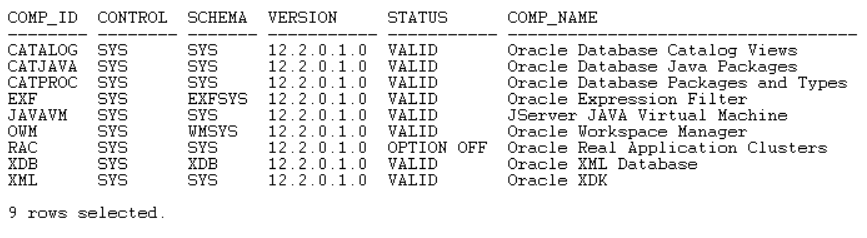
SQL>  select comp_id, control, schema, version, status, comp_name from dba_registry order by 1;


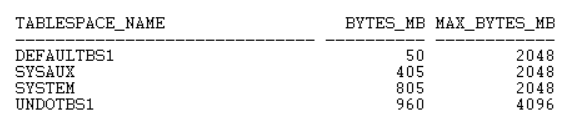
SQL>  SELECT TABLESPACE_NAME,BYTES/1024/1024 "BYTES_MB",MAXBYTES/1024/1024 "MAX_BYTES_MB" FROM DBA_DATA_FILES order by TABLESPACE_NAME;

SQL>  alter session set container = PDB$SEED;

SQL>  SELECT TABLESPACE_NAME,BYTES/1024/1024 "BYTES_MB",MAXBYTES/1024/1024 "MAX_BYTES_MB" FROM DBA_DATA_FILES order by TABLESPACE_NAME;

Step # 2:  Open a windows command prompt, set the environment variables (Make sure Oracle Home and Perl path is present).

> set ORACLE_SID=BABCDB

> set ORACLE_HOME=C:\Oracle12cR2_64Bit_DB\product

> set Path=C:\Oracle12cR2_64Bit_DB\product\bin;C:\Oracle12cR2_64Bit_DB\product\perl\bin;C:\Program Files (x86)\Common Files\Oracle\Java\javapath; C:\WINDOWS\system32;C:\WINDOWS;C:\WINDOWS\System32\...

> cd C:\Oracle12cR2_64Bit_DB\product\rdbms\admin

Step # 3:  My environment has a $ROOT CDB and $SEED PDB, I will be connecting to the $ROOT to install it.

perl catcon.pl -p 2 -u SYS/xxxxxxxxxx -l C:\temp\spatial -b catctx_install_babu -a 1 F:\Oracle12cR2_64Bit_DB\product\ctx\admin\catctx.sql 1babu 1SYSAUX 1TEMPTBS1 1NOLOCK;

catcon: ALL catcon-related output will be written to [C:\temp\spatial/catctx_install_babu_catcon_4620.lst]
catcon: See [C:\temp\spatial/catctx_install_babu*.log] files for output generated by scripts
catcon: See [C:\temp\spatial/catctx_install_babu_*.lst] files for spool files, if any
catcon.pl: completed successfully

Step # 4:  Verify the components:-

sqlplus SYS/xxxxxxxx@DEVCDB AS SYSDBA

SQL> SELECT TABLESPACE_NAME,BYTES/1024/1024 "BYTES_MB",MAXBYTES/1024/1024 "MAX_BYTES_MB" FROM DBA_DATA_FILES order by TABLESPACE_NAME;


SQL> select comp_id, control, schema, version, status, comp_name from dba_registry order by 1;


SQL> ALTER SESSION SET CONTAINER=PDB$SEED;

SQL> SELECT TABLESPACE_NAME,BYTES/1024/1024 "BYTES_MB",MAXBYTES/1024/1024 "MAX_BYTES_MB" FROM DBA_DATA_FILES order by TABLESPACE_NAME;


Step # 5:  Configure Language-specific default preferences (mine is U.S. English), connect as CTXSYS user and run below script:-

connect CTXSYS/xxxxx@devcdb 

@F:\Oracle12cR2_64Bit_DB\product\ctx\admin\defaults\drdefus.sql

After successful install,  lock the CTXSYS account and expire its password. 

conn SYS/xxxxxxxxxx@DEVCDB AS SYSDBA

Check for invalid objects in the database. If present, run utlrp.sql or recompile invalid objects.

col OBJECT_NAME for a30
col OBJECT_TYPE for a30
col OWNER for a20
SQL> select owner,object_name,object_type from dba_objects where status <> 'VALID' order by 1,2,3;

no rows selected


Tuesday, June 2, 2020

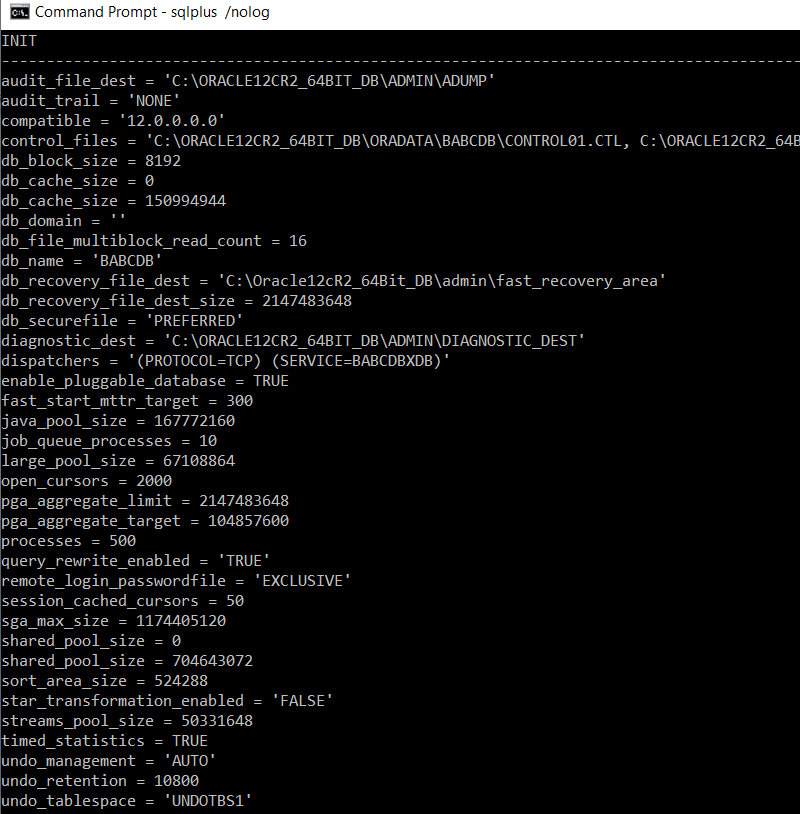
Dump contents of Oracle INIT Parameter File

Purpose: Dump the content of init parameter file that was used to start the database or create a copy of parameters and its values that was used to start the database

Environment: Oracle 12cR1 DB, on Windows, using a basic initXXXX.ora at its default location [$ORACLE_HOME\database]

SET FEEDBACK OFF 
SET LINES 190
SET PAGES 1000
COL NAME FOR A160
COL INIT FOR A190

SPOOL C:\TMP\INIT_copy.TXT

select distinct INIT from
(SELECT NAME||' = '''||VALUE||'''' INIT FROM v$system_parameter where ISDEFAULT='FALSE' and TYPE = 2 
UNION ALL
SELECT NAME||' = '||VALUE INIT FROM v$system_parameter where ISDEFAULT='FALSE' and TYPE <> 2)
order by 1;

SPOOL OFF

Init Parameters


Sunday, May 31, 2020

Manually Install Oracle Spatial in Oracle 12c R2 Container Database


Manually Install Oracle Spatial in Oracle 12c Container Database 

Purpose: Manually Install Oracle Spatial in Oracle 12c Database in a Container / Pluggable Database.


Environment:

Database Software: Oracle 12c Release 2

Operating System: Windows Server 2012 R2 Standard - 64 Bit


Prerequisites: Already created a basic (container) database without any bells and whistles. A container database (with a ROOT and SEED PDBs) and created dictionary views and system stored procedures by running catcdb.sql, refer to my previous post.


Oracle spatial depends on other Oracle components (Oracle Java, Multimedia and Oracle XML Database), since XDB (Oracle XML Database) comes integrated with the core Oracle database, I will focus on installing Java and Multimedia.


List of components in my database before I start: -


SQL> select comp_id, control, schema, version, status, comp_name from dba_registry order by 1;


Step # 1: Install Java


Open a windows command prompt, set the environment variables (Make sure Oracle Home and Perl path is present).


> set ORACLE_SID=BABCDB


> set ORACLE_HOME=C:\Oracle12cR2_64Bit_DB\product


> set Path=C:\Oracle12cR2_64Bit_DB\product\bin;C:\Oracle12cR2_64Bit_DB\product\perl\bin;C:\Program Files (x86)\Common Files\Oracle\Java\javapath; C:\WINDOWS\system32;C:\WINDOWS;C:\WINDOWS\System32\...


> cd C:\Oracle12cR2_64Bit_DB\product\rdbms\admin


I created a folder called "C:\tmp\spatial" to direct the message files (like logs, errors) that gets generated while running different scripts during this installation. And the message files will have unique names for each script based on the value I provide for the “-b” parameter in the script.


Step # 1A - INITJVM.SQL


> perl catcon.pl -p 2 -u SYS/********** -l C:\tmp\spatial -b initjvm_install_babu C:\Oracle12cR2_64Bit_DB\product\javavm\install\initjvm.sql


C:\Oracle12cR2_64Bit_DB\product\rdbms\admin>perl catcon.pl -p 2 -u SYS/********** -l C:\tmp\spatial -b initjvm_install_babu C:\Oracle12cR2_64Bit_DB\product\javavm\install\initjvm.sql

catcon: ALL catcon-related output will be written to [C:\tmp\spatial/initjvm_install_babu_catcon_8984.lst]

catcon: See [C:\tmp\spatial/initjvm_install_babu*.log] files for output generated by scripts

catcon: See [C:\tmp\spatial/initjvm_install_babu_*.lst] files for spool files, if any

catcon.pl: completed successfully


Step # 1B - INITXML.SQL


> perl catcon.pl -p 2 -u SYS/********** -l C:\tmp\spatial -b initxml_install_babu C:\Oracle12cR2_64Bit_DB\product\xdk\admin\initxml.sql


C:\Oracle12cR2_64Bit_DB\product\rdbms\admin>perl catcon.pl -p 2 -u SYS/********** -l C:\tmp\spatial -b initxml_install_babu C:\Oracle12cR2_64Bit_DB\product\xdk\admin\initxml.sql

catcon: ALL catcon-related output will be written to [C:\tmp\spatial/initxml_install_babu_catcon_20368.lst]

catcon: See [C:\tmp\spatial/initxml_install_babu*.log] files for output generated by scripts

catcon: See [C:\tmp\spatial/initxml_install_babu_*.lst] files for spool files, if any

catcon.pl: completed successfully


Step # 1C - XMLJA.SQL


> perl catcon.pl -p 2 -u SYS/********** -l C:\tmp\spatial -b xmlja_install_babu C:\Oracle12cR2_64Bit_DB\product\xdk\admin\xmlja.sql


C:\Oracle12cR2_64Bit_DB\product\rdbms\admin>perl catcon.pl -p 2 -u SYS/********** -l C:\tmp\spatial -b xmlja_install_babu C:\Oracle12cR2_64Bit_DB\product\xdk\admin\xmlja.sql

catcon: ALL catcon-related output will be written to [C:\tmp\spatial/xmlja_install_babu_catcon_12644.lst]

catcon: See [C:\tmp\spatial/xmlja_install_babu*.log] files for output generated by scripts

catcon: See [C:\tmp\spatial/xmlja_install_babu_*.lst] files for spool files, if any

catcon.pl: completed successfully


Step # 1D - CATJAVA.SQL


> perl catcon.pl -p 2 -u SYS/********** -l C:\tmp\spatial -b catjava_install_babu C:\Oracle12cR2_64Bit_DB\product\rdbms\admin\catjava.sql


C:\Oracle12cR2_64Bit_DB\product\rdbms\admin>perl catcon.pl -p 2 -u SYS/********** -l C:\tmp\spatial -b catjava_install_babu C:\Oracle12cR2_64Bit_DB\product\rdbms\admin\catjava.sql

catcon: ALL catcon-related output will be written to [C:\tmp\spatial/catjava_install_babu_catcon_276.lst]

catcon: See [C:\tmp\spatial/catjava_install_babu*.log] files for output generated by scripts

catcon: See [C:\tmp\spatial/catjava_install_babu_*.lst] files for spool files, if any

catcon.pl: completed successfully


Step # 1E- CATEXF.SQL


> perl catcon.pl -p 2 -u SYS/********** -l C:\tmp\spatial -b catexf_install_babu C:\Oracle12cR2_64Bit_DB\product\rdbms\admin\catexf.sql


C:\Oracle12cR2_64Bit_DB\product\rdbms\admin>perl catcon.pl -p 2 -u SYS/********** -l C:\tmp\spatial -b catexf_install_babu C:\Oracle12cR2_64Bit_DB\product\rdbms\admin\catexf.sql

catcon: ALL catcon-related output will be written to [C:\tmp\spatial/catexf_install_babu_catcon_21300.lst]

catcon: See [C:\tmp\spatial/catexf_install_babu*.log] files for output generated by scripts

catcon: See [C:\tmp\spatial/catexf_install_babu_*.lst] files for spool files, if any

catcon.pl: completed successfully


SQL> select comp_id, control, schema, version, status, comp_name from dba_registry order by 1;


SQL> SELECT TABLESPACE_NAME,BYTES/1024/1024 "BYTES_MB",MAXBYTES/1024/1024 "MAX_BYTES_MB" FROM DBA_DATA_FILES order by TABLESPACE_NAME;


I will use SYSAUX tablespace for both (Multimedia and Spatial) as per Oracle's recommendation.


Step # 2A - ORDINST.SQL


> perl catcon.pl -p 2 -u SYS/********** -l C:\tmp\spatial -b ordinst_install_babu -a 1 C:\Oracle12cR2_64Bit_DB\product\ord\admin\ordinst.sql 1SYSAUX 1SYSAUX


C:\Oracle12cR2_64Bit_DB\product\rdbms\admin>perl catcon.pl -p 2 -u SYS/********** -l C:\tmp\spatial -b ordinst_install_babu -a 1 C:\Oracle12cR2_64Bit_DB\product\ord\admin\ordinst.sql 1SYSAUX 1SYSAUX

catcon: ALL catcon-related output will be written to [C:\tmp\spatial/ordinst_install_babu_catcon_20516.lst]

catcon: See [C:\tmp\spatial/ordinst_install_babu*.log] files for output generated by scripts

catcon: See [C:\tmp\spatial/ordinst_install_babu_*.lst] files for spool files, if any

catcon.pl: completed successfully


Step # 2A - CATIM.SQL


> perl catcon.pl -p 2 -u SYS/********** -l C:\tmp\spatial -b catim_install_babu C:\Oracle12cR2_64Bit_DB\product\ord\im\admin\catim.sql


C:\Oracle12cR2_64Bit_DB\product\rdbms\admin>perl catcon.pl -p 2 -u SYS/********** -l C:\tmp\spatial -b catim_install_babu C:\Oracle12cR2_64Bit_DB\product\ord\im\admin\catim.sql

catcon: ALL catcon-related output will be written to [C:\tmp\spatial/catim_install_babu_catcon_3020.lst]

catcon: See [C:\tmp\spatial/catim_install_babu*.log] files for output generated by scripts

catcon: See [C:\tmp\spatial/catim_install_babu_*.lst] files for spool files, if any

catcon.pl: completed successfully


SQL> set serverout on

SQL> execute validate_ordim;

Locator INVALID OBJECTS: /252088c1_ElocationPartitionpa - INVALID - JAVA CLASS

Locator INVALID OBJECTS: /296aa566_TrafficTimezoneUserD - INVALID - JAVA CLASS

Locator INVALID OBJECTS: /3d173f4c_TrafficDataValidator - INVALID - JAVA CLASS

Locator INVALID OBJECTS: /540dac42_ElocationPartition - INVALID - JAVA CLASS

Locator INVALID OBJECTS: /67a1229a_NDMTrafficWrapper - INVALID - JAVA CLASS

Locator INVALID OBJECTS: /b3a13448_TrafficUserDataGener - INVALID - JAVA CLASS

Locator INVALID OBJECTS: /d7dbd798_TrafficUserDataGener - INVALID - JAVA CLASS

Locator INVALID OBJECTS: /dbeb7075_TrafficUserDataGener - INVALID - JAVA CLASS


PL/SQL procedure successfully completed.

select comp_id, control, schema, version, status, comp_name from dba_registry order by 1;


SQL> @C:\Oracle12cR2_64Bit_DB\product\rdbms\admin\utlrp.sql

SQL> select comp_id, control, schema, version, status, comp_name from dba_registry order by 1;


SQL> exit;


Step # 3: Installing Oracle Spatial


Step # 3A - MDPRIVS.SQL

> perl catcon.pl -p 2 -u SYS/********** -l C:\tmp\spatial -b mdprivs_install_babu C:\Oracle12cR2_64Bit_DB\product\md\admin\mdprivs.sql


C:\Oracle12cR2_64Bit_DB\product\rdbms\admin>perl catcon.pl -p 2 -u SYS/********** -l C:\tmp\spatial -b mdprivs_install_b

abu C:\Oracle12cR2_64Bit_DB\product\md\admin\mdprivs.sql

catcon: ALL catcon-related output will be written to [C:\tmp\spatial/mdprivs_install_babu_catcon_16008.lst]

catcon: See [C:\tmp\spatial/mdprivs_install_babu*.log] files for output generated by scripts

catcon: See [C:\tmp\spatial/mdprivs_install_babu_*.lst] files for spool files, if any

catcon.pl: completed successfully


Step # 2B - MDINST.SQL

 > perl catcon.pl -p 2 -u SYS/********** -l C:\tmp\spatial -b mdinst_install_babu C:\Oracle12cR2_64Bit_DB\product\md\admin\mdinst.sql


C:\Oracle12cR2_64Bit_DB\product\rdbms\admin>perl catcon.pl -p 2 -u SYS/********** -l C:\tmp\spatial -b mdinst_install_babu C:\Oracle12cR2_64Bit_DB\product\md\admin\mdinst.sql

catcon: ALL catcon-related output will be written to [C:\tmp\spatial/mdinst_install_babu_catcon_18640.lst]

catcon: See [C:\tmp\spatial/mdinst_install_babu*.log] files for output generated by scripts

catcon: See [C:\tmp\spatial/mdinst_install_babu_*.lst] files for spool files, if any

catcon.pl: completed successfully


SQL> select comp_id, control, schema, version, status, comp_name from dba_registry order by 1;


SQL> SELECT TABLESPACE_NAME,BYTES/1024/1024 "BYTES_MB",MAXBYTES/1024/1024 "MAX_BYTES_MB" FROM DBA_DATA_FILES order by TABLESPACE_NAME;


Conclusion: These components not only got installed in ROOT PDB, but also in the SEED PDB, so future PDBs created using this SEED will inherit all the components installed so far. 


Tuesday, May 26, 2020

How to Install Oracle Patch - Basic Steps

Purpose: Basic steps involved in installing an Oracle Bundle Patch (Windows OS)

Environment:
Database Software: Oracle 12c Release 2
Operating System: Windows Server 2012 R2 Standard - 64 Bit
Patch to Install: Oracle Database Patch 30446296, which a Bundle Patch (BP) patch BP 12.2.0.1.200114 (latest available as of date), downloaded from Oracle Support.

Prepare:


1. Download the latest Bundle patch and extract it at a staging area.

Read the "README.html" file that comes along with the patch. The "Prerequisites" says that "You must use the OPatch utility version 12.2.0.1.7 or later to apply this patch. Oracle recommends that you usethe latest released OPatch 12.2, which is available for download from My Oracle Support patch 6880880 by selecting the 12.2.0.1.0 release."

Install


2: Check the existing OPatch version that came as part of the 12cR2 base release:-

set ORACLE_HOME=C:\Oracle12cR2_64Bit_DB\product
set Path=C:\Oracle12cR2_64Bit_DB\product\bin;C:\Oracle12cR2_64Bit_DB\product\OPatch;C:\Program Files (x86)\

C:\> opatch version
OPatch Version: 12.2.0.1.6

OPatch succeeded.

3. Download and Copy new OPatch

I have an older version, which means I need to download OPatch 12.2.0.1.7 or later, so I again downloaded OPatch 12.2.0.1.21 (Patch 6880880) from Oracle Support and extracted it at a staging area (E:\Ora_Patch_Stage\OP_p6880880\OPatch).

Backup the existing OPatch, just in case.

xcopy /E /I C:\Oracle12cR2_64Bit_DB\product\OPatch C:\Oracle12cR2_64Bit_DB\product\OPatch_BKP

Delete the old OPatch folder

rmdir /s /q C:\Oracle12cR2_64Bit_DB\product\OPatch

Copy over the downloaded OPatch folder to the Oracle Home.

xcopy /E /I E:\Ora_Patch_Stage\OP_p6880880\OPatch C:\Oracle12cR2_64Bit_DB\product\OPatch
Check the OPatch version again:-

C:\>opatch version
OPatch Version: 12.2.0.1.21

OPatch succeeded.


Which meets the Prerequisites, so let’s proceed with installing the Oracle Bundle Patch.

4: Install the Oracle Bundle Database Bundle Patch
 

Navigate to the location where its extracted and install

E:
cd E:\Ora_Patch_Stage\BP_p30446296\30446296
cd E:\Ora_Patch_Stage\BP_p30446296\30446296\opatch apply

Verify


5. Verify the install status by checking the OPatch logs at 

"C:\Program Files\Oracle\Inventory\logs" 
"ORACLE_HOME\cfgtoollogs\opatch"

You can also check what patches have been installed by

C:\> opatch lsinventory


Sunday, May 24, 2020

Manually Creating an Oracle 12c R2 Container Database on Windows OS

Purpose: Manually Create an Oracle Container Database using SQL*Plus command prompt on Windows OS

Environment:
Database Software: Oracle 12c Release 2
Operating System: Windows Server 2012 R2 Standard - 64 Bit

1. Oracle Install: Already installed Oracle 12c Release 2 software as per my previous post.

Tip # 1: If you plan on using this install for more serious stuff (business purposes), its highly recommended to apply the latest available patch(es). Refer to my post on Installing Oracle Patch.

2. Oracle Net: Configure listener.ora, tnsnames.ora and sqlnet.ora files at "F:\Oracle12c_64Bit_DB\product\network\admin" folder with my typical settings:-

listener.ora :-

DEFAULT_SERVICE_LISTENER = BABCDB

INBOUND_CONNECT_TIMEOUT_LISTENER = 0

SID_LIST_LISTENER =
(SID_LIST =
(SID_DESC =
(SID_NAME = PLSExtProc)
(ORACLE_HOME = F:\Oracle12c_64Bit_DB\product)
(PROGRAM = extproc))
(SID_DESC =
(GLOBAL_DBNAME = BABCDB)
(ORACLE_HOME = F:\Oracle12cR2_64Bit_DB\product)
(SID_NAME = BABCDB)))

LISTENER =
(DESCRIPTION_LIST =
(DESCRIPTION =
(ADDRESS = (PROTOCOL = TCP)(HOST = SANDBOX26)(PORT = 1521))))

tnsnames.ora :-

BABCDB =
(DESCRIPTION =
(ADDRESS_LIST =
(ADDRESS = (PROTOCOL = TCP)(HOST = SANDBOX26)(PORT = 1521)))
(CONNECT_DATA =
(SERVER = DEDICATED)
(SERVICE_NAME = BABCDB)))

sqlnet.ora :-

SQLNET.INBOUND_CONNECT_TIMEOUT = 0
SQLNET.EXPIRE_TIME = 2
NAMES.DIRECTORY_PATH= (TNSNAMES, EZCONNECT)

3. DB Parameter [Init] File: Added below parameters in the initBABCDB.ora file and placed it at "F:\Oracle12c_64Bit_DB\product\database" folder:-

audit_file_dest='F:\Oracle12cR2_64Bit_DB\admin\adump'
audit_trail =none
compatible='12.0.0.0.0'
control_files='H:\ORACLE\ORADATA\BABCDB\control01.ctl','H:\ORACLE\ORADATA\BABCDB\control02.ctl','H:\ORACLE\ORADATA\BABCDB\control03.ctl'
db_block_size=8192
db_cache_size=157286400
db_domain=''
db_file_multiblock_read_count=16
db_name='BABCDB'
db_recovery_file_dest='F:\Oracle12cR2_64Bit_DB\admin\fast_recovery_area'
db_recovery_file_dest_size=2G
diagnostic_dest='F:\Oracle12cR2_64Bit_DB\admin\diagnostic_dest'
dispatchers='(PROTOCOL=TCP) (SERVICE=BABCDBXDB)'
enable_pluggable_database=true
fast_start_mttr_target=300
java_pool_size=157286400
job_queue_processes=10
large_pool_size=67108864
local_listener='LISTENER_BABCDB'
open_cursors=2000
pga_aggregate_limit=2147483648
pga_aggregate_target=104857600
processes=500
query_rewrite_enabled='TRUE'
remote_login_passwordfile='EXCLUSIVE'
session_cached_cursors=50
sga_max_size=629145600
shared_pool_size=692060160
sort_area_size=524288
star_transformation_enabled='FALSE'
streams_pool_size=50331648
timed_statistics=TRUE
undo_management='AUTO'
undo_retention=10800
undo_tablespace='UNDOTBS1'

4. Destination / Location Folders: Create folders for

audit_file_dest
db_recovery_file_dest
diagnostic_dest
control_files
datafiles and PDB seed

5. Create Oracle Service: Navigate to the bin folder, run oradim and when asked, provide the password of the local OS user that was created in the previous post.

cd F:\Oracle12cR2_64Bit_DB\product\bin

oradim -new -SID BABCDB -INTPWD xxxxxxxx -STARTMODE m -PFILE F:\Oracle12cR2_64Bit_DB\product\database\initBABCDB.ora
Enter password for Oracle service user: [provide password for OracleWinUsr user]
Instance created.

Note, the created service's start mode is manual, but its started right after creation. If not, make sure the Oracle service OracleServiceBABCDB is started.

6. Start the listener and mount the database:-

> cd F:\Oracle12cR2_64Bit_DB\product\bin

> lsnrctl start

> sqlplus SYS/xxxxxxxxxx@BABCDB AS SYSDBA

SQL> startup nomount

7. Create the (container) database:-

SQL> CREATE DATABASE BABCDB
USER SYS IDENTIFIED BY xxxxxxxxx
USER SYSTEM IDENTIFIED BY xxxxxxxxx
CONTROLFILE REUSE
LOGFILE
GROUP 1 ('H:\ORACLE\ORADATA\BABCDB\REDO_01.LOG') SIZE 100M REUSE,
GROUP 2 ('H:\ORACLE\ORADATA\BABCDB\REDO_02.LOG') SIZE 100M REUSE,
GROUP 3 ('H:\ORACLE\ORADATA\BABCDB\REDO_03.LOG') SIZE 100M REUSE
MAXLOGFILES 32
MAXLOGMEMBERS 4
MAXLOGHISTORY 100
MAXDATAFILES 254
MAXINSTANCES 1
EXTENT MANAGEMENT LOCAL
DATAFILE 'H:\ORACLE\ORADATA\BABCDB\SYSTEM_01.DBF' SIZE 300M REUSE AUTOEXTEND ON NEXT 5M MAXSIZE 2048m
SYSAUX DATAFILE 'H:\ORACLE\ORADATA\BABCDB\SYSAUX_01.DBF' SIZE 120M REUSE AUTOEXTEND ON NEXT 5M MAXSIZE 2048m
DEFAULT TABLESPACE DEFAULTBS1
DATAFILE 'H:\ORACLE\ORADATA\BABCDB\DEFAULT_01.DBF' SIZE 50M REUSE AUTOEXTEND ON NEXT 5M MAXSIZE 2048m
UNDO TABLESPACE UNDOTBS1
DATAFILE 'H:\ORACLE\ORADATA\BABCDB\UNDO_01.DBF' SIZE 200M REUSE AUTOEXTEND ON NEXT 5M MAXSIZE 4096m
DEFAULT TEMPORARY TABLESPACE TEMPTBS1
TEMPFILE 'H:\ORACLE\ORADATA\BABCDB\TEMP_01.DBF' SIZE 25M REUSE AUTOEXTEND on NEXT 1m MAXSIZE 4096m
UNIFORM SIZE 1M
CHARACTER SET WE8MSWIN1252
NATIONAL CHARACTER SET AL16UTF16
NOARCHIVELOG
ENABLE PLUGGABLE DATABASE
SEED
FILE_NAME_CONVERT = ('H:\ORACLE\ORADATA\BABCDB\','H:\ORACLE\ORADATA\BABCDB\SEEDPDB\')
SYSTEM DATAFILES SIZE 50M AUTOEXTEND ON NEXT 10M MAXSIZE 2048m
SYSAUX DATAFILES SIZE 50M
LOCAL UNDO OFF;

8. Create the dictionary views and system stored procedures

I created a folder called "C:\tmp\spatial" to direct the output files while running the catcdb.sql script.

This is done by running "catcdb.sql", which calls a perl script "catcdb.pl", both these files are located in "ORACLE_HOME\rdbms\admin" folder.

Tip # 2: Can't locate util.pm bug - Check this out.
Tip # 3: SP2-0640: Not connected error message - Check this out.

> set ORACLE_SID=BABCDB

> set ORACLE_HOME=F:\Oracle12cR2_64Bit_DB\product
> set PATH=F:\Oracle12cR2_64Bit_DB\product\bin;F:\Oracle12cR2_64Bit_DB\product\perl\bin;C:\Program Files\EMC NetWorker\nsr\bin;C:\Windows\system32;C:\Windows;C:\Windows\System32\Wbem;C:\Windows\System32\WindowsPowerShell\v1.0\

Get back to SQL*Plus and run "catcdb.sql" once again.

> sqlplus SYS/xxxxxxxxxx@BABCDB AS SYSDBA

SQL> @F:\Oracle12cR2_64Bit_DB\product\rdbms\admin\catcdb.sql

SQL> host perl -I &&rdbms_admin &&rdbms_admin_catcdb --logDirectory &&1 --logFilename &&2

Enter value for 1: C:\temp\catcdb [Location for log file]
Enter value for 2: BABU_CATCDB.LOG [Name of the log file]
Enter new password for SYS: ********
Enter new password for SYSTEM: ********
Enter temporary tablespace name: TEMPTBS1

9. Verify the log files at the provided location to confirm successful run or any errors. And query DBA_REGISTRY for components and its validity.

select comp_id, control, schema, version, status, comp_name from dba_registry order by 1;

DBA_REGISTRY


Manually Installing Oracle Database Software in Silent Mode using Response File on Windows OS

Purpose: Manually Installing Oracle Database Software in Silent Mode using Response File on Windows OS

Environment:
Database Software: Oracle 12c Release 2
Operating System: Windows Server 2012 R2 Standard - 64 Bit

Preparation:-

1. Download the oracle software and extract it in a temporary folder [C:\Tmp\database]

2. I chose to create a local windows, user not part of any group (for now), and used it (in the response file) for my installation


3. Created a folder for ORACLE_BASE

4. Created a response file called "db_resp_12cR2_simple.rsp" with below parameters:-

DECLINE_SECURITY_UPDATES=true
ORACLE_BASE=F:\Oracle12cR2_64Bit_DB
ORACLE_HOME=F:\Oracle12cR2_64Bit_DB\product
SECURITY_UPDATES_VIA_MYORACLESUPPORT=false
oracle.install.OracleHomeUserName=OracleWinUsr
oracle.install.OracleHomeUserPassword=xxxxxxxxxxx
oracle.install.db.ConfigureAsContainerDB=false
oracle.install.db.InstallEdition=EE
oracle.install.db.isRACOneInstall=false
oracle.install.option=INSTALL_DB_SWONLY
oracle.install.responseFileVersion=/oracle/install/rspfmt_dbinstall_response_schema_v12.2.0


Install:- 

5. Open command prompt as Administrator, navigate to the extracted folder where setup.exe is located and start the installation


cd C:\Tmp\database\

setup.exe -silent -noConsole -skipPrereqs -noconfig -waitForCompletion -responsefile C:\Tmp\db_resp\db_resp_12cR2_simple.rsp


Once above setup.exe command is executed, the cursor control will come back to the command line.

Verify:- 

6. The install status and progress can be found in the log files at “C:\Program Files\Oracle\Inventory\logs” like:-
installActions.log
oraInstall.err
oraInstall.out
silentInstall.log


For example, in my installActions.log it gave below message in the last section:-

*** End of Installation Page***
The installation of Oracle Database 12c was successful.


In my silentInstall.log it had below message:-

silentInstall.log
The installation of Oracle Database 12c was successful.


Monday, April 7, 2014

Manually create a Database in an Existing Oracle 11g RAC - ASM - Grid Infrastructure

Objective: Manually create (through command line interface) an Oracle 11g RAC Database in an existing Oracle 11g Grid Infrastructure - ASM Environment. The new RAC database will be called "mani" and it will have 2 instances called "mani1" and "mani2".

Method Used: Create as a single instance standalone database in one node and then convert it into a RAC database running on a 2 node cluster.

Environment:
Oracle 11g Grid Infrastructure, ASM, Oracle 11g RAC Database, 64 bit Oracle Linux Server 6.3, VMware Hypervisor ESXi 5.5

Existing RAC Setup:  2 nodes called "rac1" and "rac2", RAC database "babu" has 2 instances called "babu1" and "babu2" (currently shutdown). A shared disk / DISKGROUP to place the database files of the new database.
 

1) Start up the Cluster Resources in both nodes (if down)

In node 1, as "root" user


[oracle@rac1 ~]$ su root
Password:

[root@rac1 oracle]# . oraenv
ORACLE_SID = [oracle] ? +ASM1
The Oracle base has been set to /u01/app/oracle

[root@rac1 oracle]# crsctl start crs
CRS-4123: Oracle High Availability Services has been started.

[root@rac1 oracle]# crsctl status resource -t
--------------------------------------------------------------------------------
NAME           TARGET  STATE        SERVER                   STATE_DETAILS      
--------------------------------------------------------------------------------
Local Resources
--------------------------------------------------------------------------------
ora.DATA.dg
               ONLINE  ONLINE       rac1                                        
               ONLINE  ONLINE       rac2                                        
ora.DSK_GRP_02.dg
               ONLINE  ONLINE       rac1                                        
               ONLINE  ONLINE       rac2                                        
ora.LISTENER.lsnr
               ONLINE  ONLINE       rac1                                        
               ONLINE  ONLINE       rac2                                        
ora.asm
               ONLINE  ONLINE       rac1                     Started            
               ONLINE  ONLINE       rac2                     Started            
ora.gsd
               OFFLINE OFFLINE      rac1                                        
               OFFLINE OFFLINE      rac2                                        
ora.net1.network
               ONLINE  ONLINE       rac1                                        
               ONLINE  ONLINE       rac2                                        
ora.ons
               ONLINE  ONLINE       rac1                                        
               ONLINE  ONLINE       rac2                                        
--------------------------------------------------------------------------------
Cluster Resources
--------------------------------------------------------------------------------
ora.LISTENER_SCAN1.lsnr
      1        ONLINE  ONLINE       rac2                                        
ora.LISTENER_SCAN2.lsnr
      1        ONLINE  ONLINE       rac1                                        
ora.LISTENER_SCAN3.lsnr
      1        ONLINE  ONLINE       rac1                                        
ora.babu.db
      1        OFFLINE OFFLINE                               Instance Shutdown  
      2        OFFLINE OFFLINE                               Instance Shutdown  
ora.cvu
      1        ONLINE  ONLINE       rac1                                        
ora.oc4j
      1        ONLINE  ONLINE       rac1                                        
ora.rac1.vip
      1        ONLINE  ONLINE       rac1                                        
ora.rac2.vip
      1        ONLINE  ONLINE       rac2                                        
ora.scan1.vip
      1        ONLINE  ONLINE       rac2                                        
ora.scan2.vip
      1        ONLINE  ONLINE       rac1                                        
ora.scan3.vip
      1        ONLINE  ONLINE       rac1
    

[root@rac1 oracle]# crs_stat -t
Name           Type           Target    State     Host       
------------------------------------------------------------
ora.DATA.dg    ora....up.type ONLINE    ONLINE    rac1       
ora....P_02.dg ora....up.type ONLINE    ONLINE    rac1       
ora....ER.lsnr ora....er.type ONLINE    ONLINE    rac1       
ora....N1.lsnr ora....er.type ONLINE    ONLINE    rac2       
ora....N2.lsnr ora....er.type ONLINE    ONLINE    rac1       
ora....N3.lsnr ora....er.type ONLINE    ONLINE    rac1       
ora.asm        ora.asm.type   ONLINE    ONLINE    rac1       
ora.babu.db    ora....se.type OFFLINE   OFFLINE              
ora.cvu        ora.cvu.type   ONLINE    ONLINE    rac1       
ora.gsd        ora.gsd.type   OFFLINE   OFFLINE              
ora....network ora....rk.type ONLINE    ONLINE    rac1       
ora.oc4j       ora.oc4j.type  ONLINE    ONLINE    rac1       
ora.ons        ora.ons.type   ONLINE    ONLINE    rac1       
ora....SM1.asm application    ONLINE    ONLINE    rac1       
ora....C1.lsnr application    ONLINE    ONLINE    rac1       
ora.rac1.gsd   application    OFFLINE   OFFLINE              
ora.rac1.ons   application    ONLINE    ONLINE    rac1       
ora.rac1.vip   ora....t1.type ONLINE    ONLINE    rac1       
ora....SM2.asm application    ONLINE    ONLINE    rac2       
ora....C2.lsnr application    ONLINE    ONLINE    rac2       
ora.rac2.gsd   application    OFFLINE   OFFLINE              
ora.rac2.ons   application    ONLINE    ONLINE    rac2       
ora.rac2.vip   ora....t1.type ONLINE    ONLINE    rac2       
ora.scan1.vip  ora....ip.type ONLINE    ONLINE    rac2       
ora.scan2.vip  ora....ip.type ONLINE    ONLINE    rac1       
ora.scan3.vip  ora....ip.type ONLINE    ONLINE    rac1   


Repeat above in node 2 as well
  
2) We will be using the new DISKGROUP "DSK_GRP_02" (that we created previously) for the new database, so lets make sure its available in both nodes.  

In node 1 as "oracle" user
 
[oracle@rac1 ~]$ . oraenv
ORACLE_SID = [oracle] ? +ASM1
The Oracle base has been set to /u01/app/oracle
[oracle@rac1 ~]$ sqlplus / as sysasm

SQL> ALTER DISKGROUP DSK_GRP_02 CHECK ALL;

Diskgroup altered.

SQL> ALTER DISKGROUP DSK_GRP_02 ADD DIRECTORY '+DSK_GRP_02/MANI';

Diskgroup altered

[oracle@rac1 ~]$ asmcmd ls -lt +DSK_GRP_02
Type  Redund  Striped  Time             Sys  Name
                                        N    MANI/

In node 2 as "oracle" user

[oracle@rac2 ~]$ . oraenv
ORACLE_SID = [oracle] ? +ASM2
The Oracle base has been set to /u01/app/oracle

[oracle@rac2 ~]$ asmcmd
ASMCMD> ls -l
State    Type    Rebal  Name
MOUNTED  EXTERN  N      DATA/
MOUNTED  EXTERN  N      DSK_GRP_02/
 

3) In node 1 as "oracle" user, create necessary "oracle dump" directories, copy init.ora file from existing database (babu) and edit it:-

[oracle@rac1 ~]$ cd /u01/app/oracle/admin
[oracle@rac1 admin]$ mkdir mani
[oracle@rac1 admin]$ cd mani
[oracle@rac1 mani]$ mkdir adump
[oracle@rac1 mani]$ mkdir dpdump
[oracle@rac1 mani]$ mkdir hdump
 

Create "initmani1.ora" file by copying it from an existing database

[oracle@rac1 babu]$ cp /u01/app/oracle/admin/babu/pfile/init.ora.012014202025 $ORACLE_HOME/dbs/initmani1.ora


Content of edited "initmani1.ora" is as follows:-

audit_file_dest="/u01/app/oracle/admin/mani/adump"
audit_trail=none
# cluster_database=true
compatible=11.2.0.0.0
db_block_size=8192
db_create_file_dest="+DSK_GRP_02"
db_domain=localdomain
db_name="mani"
diagnostic_dest=/u01/app/oracle
dispatchers="(PROTOCOL=TCP) (SERVICE=maniXDB)"
memory_target=786432000
open_cursors=300
processes=150
remote_listener=rac-scan.localdomain:1521
remote_login_passwordfile=exclusive
sec_case_sensitive_logon=false
mani1.instance_number=1
mani2.instance_number=2
mani1.thread=1
mani2.thread=2
mani1.undo_tablespace=UNDOTBS1
mani2.undo_tablespace=UNDOTBS2


4) Create password file


[oracle@rac1 babu]$ echo $ORACLE_BASE $ORACLE_HOME $ORACLE_SID
/u01/app/oracle /u01/app/oracle/product/11.2.0/dbhome_1 babu

[oracle@rac1 dbs]$ export ORACLE_SID=mani1
[oracle@rac1 dbs]$ echo $ORACLE_SID
mani1

[oracle@rac1 dbs]$ orapwd file=$ORACLE_HOME/dbs/orapw$ORACLE_SID password=oracle

[oracle@rac1 dbs]$ ls -l
total 32
-rw-rw---- 1 oracle oinstall 1544 Feb 15 10:25 hc_babu1.dat
-rw-r----- 1 oracle oinstall   35 Jan  1 20:20 initbabu1.ora
-rw-r--r-- 1 oracle oinstall  555 Feb 15 11:03 initmani1.ora
-rw-r--r-- 1 oracle oinstall 2851 May 15  2009 init.ora
-rw-r----- 1 oracle oinstall 1536 Jan  1 20:16 orapwbabu1
-rw-r----- 1 oracle oinstall 1536 Feb 15 11:13 orapwmani1


5) Listener and TNS files

[oracle@rac1 admin]$ srvctl config scan_listener
SCAN Listener LISTENER_SCAN1 exists. Port: TCP:1521
SCAN Listener LISTENER_SCAN2 exists. Port: TCP:1521
SCAN Listener LISTENER_SCAN3 exists. Port: TCP:1521

[oracle@rac1 admin]$ srvctl config listener
Name: LISTENER
Network: 1, Owner: oracle
Home:
End points: TCP:1521

[oracle@rac1 admin]$ srvctl status listener
Listener LISTENER is enabled
Listener LISTENER is running on node(s): rac2,rac1

[oracle@rac1 admin]$ srvctl status scan_listener
SCAN Listener LISTENER_SCAN1 is enabled
SCAN listener LISTENER_SCAN1 is running on node rac2
SCAN Listener LISTENER_SCAN2 is enabled
SCAN listener LISTENER_SCAN2 is running on node rac1
SCAN Listener LISTENER_SCAN3 is enabled
SCAN listener LISTENER_SCAN3 is running on node rac1

[oracle@rac1 ~]$ cd $ORACLE_HOME/network/admin

[oracle@rac1 admin]$ lsnrctl

LSNRCTL for Linux: Version 11.2.0.3.0 - Production on 15-FEB-2014 11:31:46

Copyright (c) 1991, 2011, Oracle.  All rights reserved.

Welcome to LSNRCTL, type "help" for information.

LSNRCTL> stat
Connecting to (ADDRESS=(PROTOCOL=tcp)(HOST=)(PORT=1521))
STATUS of the LISTENER
------------------------
Alias                     LISTENER
Version                   TNSLSNR for Linux: Version 11.2.0.3.0 - Production
Start Date                15-FEB-2014 18:24:01
Uptime                    0 days 3 hr. 7 min. 48 sec
Trace Level               off
Security                  ON: Local OS Authentication
SNMP                      OFF
Listener Parameter File   /u01/app/11.2.0/grid/network/admin/listener.ora
Listener Log File         /u01/app/oracle/diag/tnslsnr/rac1/listener/alert/log.xml
Listening Endpoints Summary...
  (DESCRIPTION=(ADDRESS=(PROTOCOL=ipc)(KEY=LISTENER)))
  (DESCRIPTION=(ADDRESS=(PROTOCOL=tcp)(HOST=192.168.56.71)(PORT=1521)))
  (DESCRIPTION=(ADDRESS=(PROTOCOL=tcp)(HOST=192.168.56.81)(PORT=1521)))
Services Summary...
Service "+ASM" has 1 instance(s).
  Instance "+ASM1", status READY, has 1 handler(s) for this service...
The command completed successfully

[oracle@rac1 admin]$ more listener.ora
LISTENER=(DESCRIPTION=(ADDRESS_LIST=(ADDRESS=(PROTOCOL=IPC)(KEY=LISTENER))))        # line added by Agent
LISTENER_SCAN3=(DESCRIPTION=(ADDRESS_LIST=(ADDRESS=(PROTOCOL=IPC)(KEY=LISTENER_SCAN3))))        # line added by Agent
LISTENER_SCAN2=(DESCRIPTION=(ADDRESS_LIST=(ADDRESS=(PROTOCOL=IPC)(KEY=LISTENER_SCAN2))))        # line added by Agent
LISTENER_SCAN1=(DESCRIPTION=(ADDRESS_LIST=(ADDRESS=(PROTOCOL=IPC)(KEY=LISTENER_SCAN1))))        # line added by Agent
ENABLE_GLOBAL_DYNAMIC_ENDPOINT_LISTENER_SCAN1=ON        # line added by Agent
ENABLE_GLOBAL_DYNAMIC_ENDPOINT_LISTENER_SCAN2=ON        # line added by Agent
ENABLE_GLOBAL_DYNAMIC_ENDPOINT_LISTENER_SCAN3=ON        # line added by Agent
ENABLE_GLOBAL_DYNAMIC_ENDPOINT_LISTENER=ON        # line added by Agent


Edit "tnsnames.ora" file

[oracle@rac1 ~]$ cd $ORACLE_HOME/network/admin

[oracle@rac1 admin]$ more tnsnames.ora
BABU =
  (DESCRIPTION =
    (ADDRESS = (PROTOCOL = TCP)(HOST = rac-scan.localdomain)(PORT = 1521))
    (CONNECT_DATA =
      (SERVER = DEDICATED)
      (SERVICE_NAME = babu.localdomain)
    )
  )

BABU1 =
  (DESCRIPTION =
    (ADDRESS = (PROTOCOL = TCP)(HOST = 192.168.56.81)(PORT = 1521))
    (CONNECT_DATA =
      (SERVER = DEDICATED)
      (SERVICE_NAME = babu.localdomain)
      (INSTANCE_NAME = babu1)
    )
  )

BABU2 =
  (DESCRIPTION =
    (ADDRESS = (PROTOCOL = TCP)(HOST = 192.168.56.82)(PORT = 1521))
    (CONNECT_DATA =
      (SERVER = DEDICATED)
      (SERVICE_NAME = babu.localdomain)
      (INSTANCE_NAME = babu2)

    )
  )

MANI =
  (DESCRIPTION =
    (ADDRESS = (PROTOCOL = TCP)(HOST = rac-scan.localdomain)(PORT = 1521))
    (CONNECT_DATA =
      (SERVER = DEDICATED)
      (SERVICE_NAME = mani.localdomain)
    )
  )

MANI1 =
  (DESCRIPTION =
    (ADDRESS = (PROTOCOL = TCP)(HOST = 192.168.56.81)(PORT = 1521))
    (CONNECT_DATA =
      (SERVER = DEDICATED)
      (SERVICE_NAME = mani.localdomain)
      (INSTANCE_NAME = mani1)

    )
  )

MANI2 =
  (DESCRIPTION =
    (ADDRESS = (PROTOCOL = TCP)(HOST = 192.168.56.82)(PORT = 1521))
    (CONNECT_DATA =
      (SERVER = DEDICATED)
      (SERVICE_NAME = mani.localdomain)
      (INSTANCE_NAME = mani2)
    )
  )


6) In node 1 as "oracle" user, create the database
 

[oracle@rac1 ~]$ . oraenv
ORACLE_SID = [oracle] ? babu
The Oracle base has been set to /u01/app/oracle

[oracle@rac1 ~]$ echo $ORACLE_BASE $ORACLE_HOME $ORACLE_SID
/u01/app/oracle /u01/app/oracle/product/11.2.0/dbhome_1 babu

[oracle@rac1 ~]$ export ORACLE_SID=mani1

[oracle@rac1 ~]$ echo $ORACLE_BASE $ORACLE_HOME $ORACLE_SID
/u01/app/oracle /u01/app/oracle/product/11.2.0/dbhome_1 mani1
 

[oracle@rac1 ~]$ sqlplus / as sysdba

SQL> startup nomount;
ORACLE instance started.

Total System Global Area  784998400 bytes
Fixed Size            2232472 bytes
Variable Size          524291944 bytes
Database Buffers      255852544 bytes
Redo Buffers            2621440 bytes

SQL> select * from V$instance;

INSTANCE_NUMBER INSTANCE_NAME
--------------- ----------------
HOST_NAME
----------------------------------------------------------------
VERSION       STARTUP_T STATUS     PAR    THREAD# ARCHIVE LOG_SWITCH_WAIT
----------------- --------- ------------ --- ---------- ------- ---------------
LOGINS       SHU DATABASE_STATUS     INSTANCE_ROLE        ACTIVE_ST BLO
---------- --- ----------------- ------------------ --------- ---
          1 mani1
rac1.localdomain
11.2.0.3.0      22-FEB-14 STARTED     YES          0 STOPPED
ALLOSat    NO  ACTIVE         UNKNOWN        NORMAL    NO


SQL> CREATE DATABASE "MANI"

    MAXLOGFILES 192    MAXLOGMEMBERS 3
    MAXDATAFILES 1024
    MAXINSTANCES 32
    MAXLOGHISTORY 292
LOGFILE GROUP 1  SIZE 50M,
    GROUP 2  SIZE 50M
DATAFILE SIZE 300M AUTOEXTEND ON NEXT 5M MAXSIZE UNLIMITED EXTENT MANAGEMENT LOCAL
SYSAUX DATAFILE SIZE 120M AUTOEXTEND ON NEXT 5M MAXSIZE UNLIMITED
DEFAULT TABLESPACE USERS DATAFILE SIZE 50M
DEFAULT TEMPORARY TABLESPACE TEMP TEMPFILE SIZE 20M AUTOEXTEND ON NEXT 5M MAXSIZE 2048M
UNDO TABLESPACE UNDOTBS1 DATAFILE SIZE 50M AUTOEXTEND ON NEXT 5M MAXSIZE 2048M
USER SYS IDENTIFIED BY ORACLE
USER SYSTEM IDENTIFIED BY ORACLE
CHARACTER SET WE8MSWIN1252
NATIONAL CHARACTER SET AL16UTF16
NOARCHIVELOG;
 

Database created.

Create UNDO tablespace and run below post database creation scripts:-

SQL> CREATE UNDO TABLESPACE UNDOTBS2 DATAFILE SIZE 50M AUTOEXTEND ON NEXT 5M MAXSIZE 2048M; 

SQL> @/u01/app/oracle/product/11.2.0/dbhome_1/rdbms/admin/catalog.sql 

SQL> @/u01/app/oracle/product/11.2.0/dbhome_1/rdbms/admin/catproc.sql

7) Control Files and Log Files changes

SQL> select value from v$parameter where name ='control_files';

VALUE
--------------------------------------------------------------------------------
+DSK_GRP_02/mani/controlfile/current.256.839537095

SQL> show parameter control_files

NAME                     TYPE     VALUE
------------------------------------ ----------- ------------------------------
control_files                 string     +DSK_GRP_02/mani/controlfile/current.256.839537095


Add above value for the "control_files" in the initmani1.ora

vi /$ORACLE_HOME/dbs/initmani1.ora

control_files = '+DSK_GRP_02/mani/controlfile/current.256.839537095'

SQL> select member from v$logfile;

MEMBER
--------------------------------------------------------------------------------
+DSK_GRP_02/mani/onlinelog/group_1.257.839537099
+DSK_GRP_02/mani/onlinelog/group_2.258.839537101

2 rows selected.


Thread 2 is for instance on 2nd node, see init parameter "mani2.thread=2"

SQL> alter database add logfile thread 2 group 3 size 50m, group 4  size 50m;

Database altered.

SQL> alter database enable public thread 2;

Database altered.

SQL> select * from v$log;

    GROUP#    THREAD#  SEQUENCE#      BYTES  BLOCKSIZE    MEMBERS ARC STATUS           FIRST_CHANGE# FIRST_TIM NEXT_CHANGE# NEXT_TIME
---------- ---------- ---------- ---------- ---------- ---------- --- ---------------- ------------- --------- ------------ ---------
         1          1         13   52428800        512          1 NO  INACTIVE                191937 22-FEB-14       199062 22-FEB-14
         2          1         14   52428800        512          1 NO  CURRENT                 199062 22-FEB-14   2.8147E+14
         3          2          1   52428800        512          1 NO  CURRENT                 209541 22-FEB-14   2.8147E+14 22-FEB-14
         4          2          0   52428800        512          1 YES UNUSED                       0                      0

4 rows selected.

SQL> select * from v$logfile;

    GROUP# STATUS  TYPE    MEMBER                                             IS_
---------- ------- ------- -------------------------------------------------- ---
         1         ONLINE  +DSK_GRP_02/mani/onlinelog/group_1.257.839537099   NO
         2         ONLINE  +DSK_GRP_02/mani/onlinelog/group_2.258.839537101   NO
         3         ONLINE  +DSK_GRP_02/mani/onlinelog/group_3.265.839549313   NO
         4         ONLINE  +DSK_GRP_02/mani/onlinelog/group_4.266.839549319   NO

4 rows selected.


8) Convert standalone database to RAC database
 
SQL> show parameter cluster_database

NAME                                 TYPE        VALUE
------------------------------------ ----------- ------------------------------
cluster_database                     boolean     FALSE
cluster_database_instances           integer     1

SQL> show parameter instance

NAME                                 TYPE        VALUE
------------------------------------ ----------- ------------------------------
active_instance_count                integer
cluster_database_instances           integer     1
instance_groups                      string
instance_name                        string      mani1
instance_number                      integer     1
instance_type                        string      RDBMS
open_links_per_instance              integer     4
parallel_instance_group              string
parallel_server_instances            integer     1

SQL> shutdown immediate;


Uncomment below init parameter and start up the database

cluster_database=true

SQL> startup

SQL> show parameter cluster_database
show parameter instance

NAME                                 TYPE        VALUE
------------------------------------ ----------- ------------------------------
cluster_database                     boolean     TRUE
cluster_database_instances           integer     2
 

SQL> show parameter instance
NAME                                 TYPE        VALUE
------------------------------------ ----------- ------------------------------
active_instance_count                integer
cluster_database_instances           integer     2
instance_groups                      string
instance_name                        string      mani1
instance_number                      integer     1
instance_type                        string      RDBMS
open_links_per_instance              integer     4
parallel_instance_group              string
parallel_server_instances            integer     2
Create the dictionary views needed for Oracle RAC databases.

SQL> @/u01/app/oracle/product/11.2.0/dbhome_1/rdbms/admin/catclust.sql

9) Create spfile from pfile and make the database use it.

SQL> create spfile='+DSK_GRP_02/mani/spfilemani.ora' from pfile;

File created.


Shutdown, backup existing "initmani1.ora", update it to use the spfile we just created and startup the database.

 
SQL> shutdown immediate;
Database closed.

[oracle@rac1 dbs]$ ls -l
total 28
-rw-rw---- 1 oracle oinstall 1544 Feb 15 13:36 hc_babu1.dat
-rw-rw---- 1 oracle oinstall 1544 Feb 22 14:49 hc_mani1.dat
-rw-r----- 1 oracle oinstall   35 Jan  1 20:20 initbabu1.ora
-rw-r--r-- 1 oracle oinstall  655 Feb 22 14:26 initmani1.ora
-rw-r--r-- 1 oracle oinstall 2851 May 15  2009 init.ora
-rw-r----- 1 oracle oinstall 1536 Jan  1 20:16 orapwbabu1
-rw-r----- 1 oracle oinstall 1536 Feb 15 11:13 orapwmani1


[oracle@rac1 dbs]$ mv /$ORACLE_HOME/dbs/initmani1.ora /$ORACLE_HOME/dbs/initmani1.ora.bkp


[oracle@rac1 dbs]$ vi /$ORACLE_HOME/dbs/initmani1.ora

SPFILE='+DSK_GRP_02/mani/spfilemani.ora'

[oracle@rac1 dbs]$ ls -l
total 32
-rw-rw---- 1 oracle oinstall 1544 Feb 15 13:36 hc_babu1.dat
-rw-rw---- 1 oracle oinstall 1544 Feb 22 14:49 hc_mani1.dat
-rw-r----- 1 oracle oinstall   35 Jan  1 20:20 initbabu1.ora
-rw-r--r-- 1 oracle oinstall   42 Feb 22 14:50 initmani1.ora
-rw-r--r-- 1 oracle oinstall  655 Feb 22 14:26 initmani1.ora.bkp
-rw-r--r-- 1 oracle oinstall 2851 May 15  2009 init.ora
-rw-r----- 1 oracle oinstall 1536 Jan  1 20:16 orapwbabu1
-rw-r----- 1 oracle oinstall 1536 Feb 15 11:13 orapwmani1

SQL> startup


Make sure the DB is using spfile

SQL> show parameter spfile

NAME                                 TYPE        VALUE
------------------------------------ ----------- ------------------------------
spfile                               string      +DSK_GRP_02/mani/spfilemani.ora

SQL> select value from v$parameter where name='spfile';

VALUE
----------------------------------------------------------------------------------------------------
+DSK_GRP_02/mani/spfilemani.ora

1 row selected.
 

10) Copy the init and password file to node 2

[oracle@rac1 dbs]$ scp $ORACLE_HOME/dbs/initmani1.ora rac2:$ORACLE_HOME/dbs/initmani2.ora
initmani1.ora         100%   42     0.0KB/s   00:00  
  

[oracle@rac1 dbs]$ scp $ORACLE_HOME/dbs/orapwmani1 rac2:$ORACLE_HOME/dbs/orapwmani2
orapwmani1        100% 1536     1.5KB/s   00:00   


Check if below files are present in node 2

[oracle@rac2 dbs]$ ls -l
total 24
-rw-rw---- 1 oracle oinstall 1544 Feb 22 14:57 hc_babu2.dat
-rw-r----- 1 oracle oinstall   35 Jan  1 20:20 initbabu2.ora
-rw-r--r-- 1 oracle oinstall   42 Feb 22 15:07 initmani2.ora
-rw-r--r-- 1 oracle oinstall 2851 Jan  1 19:53 init.ora
-rw-r----- 1 oracle oinstall 1536 Jan  1 20:16 orapwbabu2
-rw-r----- 1 oracle oinstall 1536 Feb 22 15:07 orapwmani2


11) In node 2 as "oracle" user, create necessary "oracle dump" directories and start up the database:- 

[oracle@rac2 ~]$ . oraenv
ORACLE_SID = [oracle] ? babu
The Oracle base has been set to /u01/app/oracle
[oracle@rac2 ~]$ cd /$ORACLE_BASE/admin
[oracle@rac2 admin]$ mkdir mani
[oracle@rac2 admin]$ cd mani
[oracle@rac2 mani]$ mkdir adump
[oracle@rac2 mani]$ mkdir dpdump
[oracle@rac2 mani]$ mkdir hdump

[oracle@rac2 ~]$ echo $ORACLE_BASE $ORACLE_HOME $ORACLE_SID
/u01/app/oracle /u01/app/oracle/product/11.2.0/dbhome_1 mani2

[oracle@rac2 ~]$ sqlplus / as sysdba

SQL> startup

SQL> col host_name for a20
SQL> col instance_name for a20
SQL> select instance_name,host_name from gv$instance;
INSTANCE_NAME         HOST_NAME
-------------------- --------------------
mani2             rac2.localdomain
mani1             rac1.localdomain


Check the participating instances:-
 
SQL> select * from v$active_instances;
INST_NUMBER INST_NAME
----------- ------------------------------------------------------------
      1 rac1.localdomain:mani1
      2 rac2.localdomain:mani2


Also check the participating instances from
node1:-
 

SQL> select * from v$active_instances;

INST_NUMBER INST_NAME
----------- ------------------------------------------------------------
          1 rac1.localdomain:mani1
          2 rac2.localdomain:mani2

2 rows selected.

SQL> col instance_name for a20
SQL> col host_name for a20
SQL> select instance_name,host_name from gv$instance;
INSTANCE_NAME        HOST_NAME
-------------------- --------------------
mani1                rac1.localdomain
mani2                rac2.localdomain

2 rows selected.


12) Add the new database in the cluster resource

- Shutdown the new database (both database instances)
- Cluster Resources in both nodes should be up and running
 

Perform the following from node1:-
 

[oracle@rac1 ~]$ su root
Password:
[root@rac1 oracle]# . oraenv
ORACLE_SID = [oracle] ? +ASM1
The Oracle base has been set to /u01/app/oracle
[root@rac1 oracle]# crsctl start crs
CRS-4123: Oracle High Availability Services has been started.

[oracle@rac1 ~]$ . oraenv
ORACLE_SID = [oracle] ? babu
The Oracle base has been set to /u01/app/oracle
[oracle@rac1 ~]$ export ORACLE_SID=mani1
[oracle@rac1 ~]$ echo $ORACLE_SID $ORACLE_HOME $ORACLE_BASE
mani1 /u01/app/oracle/product/11.2.0/dbhome_1 /u01/app/oracle
[oracle@rac1 ~]$ srvctl add database -d mani -o $ORACLE_HOME -m localdomain
[oracle@rac1 ~]$ srvctl add instance -d mani -i mani1 -n rac1
[oracle@rac1 ~]$ srvctl add instance -d mani -i mani2 -n rac2


Check the status of new database:-

[root@rac1 oracle]# crs_stat -t -v
Name           Type           R/RA   F/FT   Target    State     Host       
----------------------------------------------------------------------
ora.DATA.dg    ora....up.type 0/5    0/     ONLINE    ONLINE    rac1       
ora....P_02.dg ora....up.type 0/5    0/     ONLINE    ONLINE    rac1       
ora....ER.lsnr ora....er.type 0/5    0/     ONLINE    ONLINE    rac1       
ora....N1.lsnr ora....er.type 0/5    0/0    ONLINE    ONLINE    rac2       
ora....N2.lsnr ora....er.type 0/5    0/0    ONLINE    ONLINE    rac1       
ora....N3.lsnr ora....er.type 0/5    0/0    ONLINE    ONLINE    rac1       
ora.asm        ora.asm.type   0/5    0/     ONLINE    ONLINE    rac1       
ora.babu.db    ora....se.type 0/2    0/1    OFFLINE   OFFLINE              
ora.cvu        ora.cvu.type   0/5    0/0    ONLINE    ONLINE    rac1       
ora.gsd        ora.gsd.type   0/5    0/     OFFLINE   OFFLINE              
ora.mani.db    ora....se.type 0/2    0/1    OFFLINE   OFFLINE              
ora....network ora....rk.type 0/5    0/     ONLINE    ONLINE    rac1       
ora.oc4j       ora.oc4j.type  0/1    0/2    ONLINE    ONLINE    rac1       
ora.ons        ora.ons.type   0/3    0/     ONLINE    ONLINE    rac1       
ora....SM1.asm application    0/5    0/0    ONLINE    ONLINE    rac1       
ora....C1.lsnr application    0/5    0/0    ONLINE    ONLINE    rac1       
ora.rac1.gsd   application    0/5    0/0    OFFLINE   OFFLINE              
ora.rac1.ons   application    0/3    0/0    ONLINE    ONLINE    rac1       
ora.rac1.vip   ora....t1.type 0/0    0/0    ONLINE    ONLINE    rac1       
ora....SM2.asm application    0/5    0/0    ONLINE    ONLINE    rac2       
ora....C2.lsnr application    0/5    0/0    ONLINE    ONLINE    rac2       
ora.rac2.gsd   application    0/5    0/0    OFFLINE   OFFLINE              
ora.rac2.ons   application    0/3    0/0    ONLINE    ONLINE    rac2       
ora.rac2.vip   ora....t1.type 0/0    0/0    ONLINE    ONLINE    rac2       
ora.scan1.vip  ora....ip.type 0/0    0/0    ONLINE    ONLINE    rac2       
ora.scan2.vip  ora....ip.type 0/0    0/0    ONLINE    ONLINE    rac1       
ora.scan3.vip  ora....ip.type 0/0    0/0    ONLINE    ONLINE    rac1       


[oracle@rac1 ~]$ srvctl status database -d mani
Instance mani1 is not running on node rac1
Instance mani2 is not running on node rac2
[oracle@rac1 ~]$ srvctl status asm -n rac1
ASM is running on rac1
[oracle@rac1 ~]$ srvctl status asm -n rac2
ASM is running on rac2
[oracle@rac1 ~]$ srvctl status instance -d mani -i mani1
Instance mani1 is not running on node rac1
[oracle@rac1 ~]$ srvctl status instance -d mani -i mani2
Instance mani2 is not running on node rac2

[oracle@rac1 ~]$ srvctl config database -d mani
Database unique name: mani
Database name:
Oracle home: /u01/app/oracle/product/11.2.0/dbhome_1
Oracle user: oracle
Spfile:
Domain: localdomain
Start options: open
Stop options: immediate
Database role: PRIMARY
Management policy: AUTOMATIC
Server pools: mani
Database instances: mani1,mani2
Disk Groups:
Mount point paths:
Services:
Type: RAC
Database is administrator managed

[oracle@rac1 ~]$ lsnrctl stat

LSNRCTL for Linux: Version 11.2.0.3.0 - Production on 18-FEB-2014 08:34:32

Copyright (c) 1991, 2011, Oracle.  All rights reserved.

Connecting to (ADDRESS=(PROTOCOL=tcp)(HOST=)(PORT=1521))
STATUS of the LISTENER
------------------------
Alias                     LISTENER
Version                   TNSLSNR for Linux: Version 11.2.0.3.0 - Production
Start Date                18-FEB-2014 18:15:50
Uptime                    0 days 0 hr. 18 min. 43 sec
Trace Level               off
Security                  ON: Local OS Authentication
SNMP                      OFF
Listener Parameter File   /u01/app/11.2.0/grid/network/admin/listener.ora
Listener Log File         /u01/app/oracle/diag/tnslsnr/rac1/listener/alert/log.xml
Listening Endpoints Summary...
  (DESCRIPTION=(ADDRESS=(PROTOCOL=ipc)(KEY=LISTENER)))
  (DESCRIPTION=(ADDRESS=(PROTOCOL=tcp)(HOST=192.168.56.71)(PORT=1521)))
  (DESCRIPTION=(ADDRESS=(PROTOCOL=tcp)(HOST=192.168.56.81)(PORT=1521)))
Services Summary...
Service "+ASM" has 1 instance(s).
  Instance "+ASM1", status READY, has 1 handler(s) for this service...
The command completed successfully


13) Start the new database:-

[root@rac1 oracle]# srvstl start database -d mani
 

Again, check the status of new database:-

[root@rac1 oracle]# crs_stat -t -v
Name           Type           R/RA   F/FT   Target    State     Host       
----------------------------------------------------------------------
ora.DATA.dg    ora....up.type 0/5    0/     ONLINE    ONLINE    rac1       
ora....P_02.dg ora....up.type 0/5    0/     ONLINE    ONLINE    rac1       
ora....ER.lsnr ora....er.type 0/5    0/     ONLINE    ONLINE    rac1       
ora....N1.lsnr ora....er.type 0/5    0/0    ONLINE    ONLINE    rac2       
ora....N2.lsnr ora....er.type 0/5    0/0    ONLINE    ONLINE    rac1       
ora....N3.lsnr ora....er.type 0/5    0/0    ONLINE    ONLINE    rac1       
ora.asm        ora.asm.type   0/5    0/     ONLINE    ONLINE    rac1       
ora.babu.db    ora....se.type 0/2    0/1    OFFLINE   OFFLINE              
ora.cvu        ora.cvu.type   0/5    0/0    ONLINE    ONLINE    rac1       
ora.gsd        ora.gsd.type   0/5    0/     OFFLINE   OFFLINE              
ora.mani.db    ora....se.type 0/2    0/1    ONLINE    ONLINE    rac1       
ora....network ora....rk.type 0/5    0/     ONLINE    ONLINE    rac1       
ora.oc4j       ora.oc4j.type  0/1    0/2    ONLINE    ONLINE    rac1       
ora.ons        ora.ons.type   0/3    0/     ONLINE    ONLINE    rac1       
ora....SM1.asm application    0/5    0/0    ONLINE    ONLINE    rac1       
ora....C1.lsnr application    0/5    0/0    ONLINE    ONLINE    rac1       
ora.rac1.gsd   application    0/5    0/0    OFFLINE   OFFLINE              
ora.rac1.ons   application    0/3    0/0    ONLINE    ONLINE    rac1       
ora.rac1.vip   ora....t1.type 0/0    0/0    ONLINE    ONLINE    rac1       
ora....SM2.asm application    0/5    0/0    ONLINE    ONLINE    rac2       
ora....C2.lsnr application    0/5    0/0    ONLINE    ONLINE    rac2       
ora.rac2.gsd   application    0/5    0/0    OFFLINE   OFFLINE              
ora.rac2.ons   application    0/3    0/0    ONLINE    ONLINE    rac2       
ora.rac2.vip   ora....t1.type 0/0    0/0    ONLINE    ONLINE    rac2       
ora.scan1.vip  ora....ip.type 0/0    0/0    ONLINE    ONLINE    rac2       
ora.scan2.vip  ora....ip.type 0/0    0/0    ONLINE    ONLINE    rac1       
ora.scan3.vip  ora....ip.type 0/0    0/0    ONLINE    ONLINE    rac1  

[oracle@rac1 ~]$ srvctl status database -d mani
Instance mani1 is running on node rac1
Instance mani2 is running on node rac2
[oracle@rac1 ~]$ srvctl status instance -d mani -i mani1
Instance mani1 is running on node rac1
[oracle@rac1 ~]$ srvctl status instance -d mani -i mani2
Instance mani2 is running on node rac2
[oracle@rac1 ~]$ lsnrctl stat

LSNRCTL for Linux: Version 11.2.0.3.0 - Production on 18-FEB-2014 08:50:10

Copyright (c) 1991, 2011, Oracle.  All rights reserved.

Connecting to (ADDRESS=(PROTOCOL=tcp)(HOST=)(PORT=1521))
STATUS of the LISTENER
------------------------
Alias                     LISTENER
Version                   TNSLSNR for Linux: Version 11.2.0.3.0 - Production
Start Date                18-FEB-2014 18:15:50
Uptime                    0 days 0 hr. 34 min. 21 sec
Trace Level               off
Security                  ON: Local OS Authentication
SNMP                      OFF
Listener Parameter File   /u01/app/11.2.0/grid/network/admin/listener.ora
Listener Log File         /u01/app/oracle/diag/tnslsnr/rac1/listener/alert/log.xml
Listening Endpoints Summary...
  (DESCRIPTION=(ADDRESS=(PROTOCOL=ipc)(KEY=LISTENER)))
  (DESCRIPTION=(ADDRESS=(PROTOCOL=tcp)(HOST=192.168.56.71)(PORT=1521)))
  (DESCRIPTION=(ADDRESS=(PROTOCOL=tcp)(HOST=192.168.56.81)(PORT=1521)))
Services Summary...
Service "+ASM" has 1 instance(s).
  Instance "+ASM1", status READY, has 1 handler(s) for this service...
Service "mani.localdomain" has 1 instance(s).
  Instance "mani1", status READY, has 1 handler(s) for this service...
Service "maniXDB.localdomain" has 1 instance(s).
  Instance "mani1", status READY, has 1 handler(s) for this service...
The command completed successfully


Log into the databases and check the status

[oracle@rac1 ~]$ export ORACLE_SID=mani1 ORACLE_HOME=/u01/app/oracle/product/11.2.0/dbhome_1
[oracle@rac1 ~]$ export PATH=$PATH:$ORACLE_HOME/bin
[oracle@rac1 ~]$ echo $ORACLE_SID $ORACLE_HOME $PATH
mani1 /u01/app/oracle/product/11.2.0/dbhome_1 /usr/lib64/qt-3.3/bin:/usr/local/bin:/usr/bin:/bin:/usr/local/sbin:/usr/sbin:/sbin:/home/oracle/bin:/u01/app/oracle/product/11.2.0/dbhome_1/bin
[oracle@rac1 ~]$ sqlplus / as sysdba

SQL> select * from v$active_instances;

INST_NUMBER INST_NAME
----------- ------------------------------------------------------------
      1 rac1.localdomain:mani1
      2 rac2.localdomain:mani2

SQL> col host_name for a25
SQL> select instance_name,host_name from v$instance;

INSTANCE_NAME     HOST_NAME
---------------- -------------------------
mani1         rac1.localdomain

SQL> conn sys/*****@mani2 as sysdba

Connected.
SQL> select * from v$active_instances;

INST_NUMBER INST_NAME
----------- ------------------------------------------------------------
      1 rac1.localdomain:mani1
      2 rac2.localdomain:mani2

SQL> col host_name for a25
SQL> select instance_name,host_name from v$instance;

INSTANCE_NAME     HOST_NAME
---------------- -------------------------
mani2         rac2.localdomain


14) Shutdown the new database

[oracle@rac1 ~]$ export ORACLE_SID=mani1 ORACLE_HOME=/u01/app/oracle/product/11.2.0/dbhome_1
[oracle@rac1 ~]$ export PATH=$PATH:$ORACLE_HOME/bin
[oracle@rac1 ~]$ srvctl stop database -d mani

[oracle@rac1 ~]$ srvctl status database -d mani
Instance mani1 is not running on node rac1
Instance mani2 is not running on node rac2

[oracle@rac1 ~]$ srvctl status instance -d mani -i mani1
Instance mani1 is not running on node rac1

[oracle@rac1 ~]$ srvctl status instance -d mani -i mani2
Instance mani2 is not running on node rac2

[oracle@rac1 ~]$ srvctl status instance -d mani -n rac1
Instance mani1 is not running on node rac1

[oracle@rac1 ~]$ su root
Password:

[root@rac1 oracle]# . oraenv
ORACLE_SID = [mani1] ? +ASM1
The Oracle base has been set to /u01/app/oracle

[root@rac1 oracle]# crs_stat -t -v
Name           Type           R/RA   F/FT   Target    State     Host      
----------------------------------------------------------------------
ora.DATA.dg    ora....up.type 0/5    0/     ONLINE    ONLINE    rac1      
ora....P_02.dg ora....up.type 0/5    0/     ONLINE    ONLINE    rac1      
ora....ER.lsnr ora....er.type 0/5    0/     ONLINE    ONLINE    rac1      
ora....N1.lsnr ora....er.type 0/5    0/0    ONLINE    ONLINE    rac2      
ora....N2.lsnr ora....er.type 0/5    0/0    ONLINE    ONLINE    rac1      
ora....N3.lsnr ora....er.type 0/5    0/0    ONLINE    ONLINE    rac1      
ora.asm        ora.asm.type   0/5    0/     ONLINE    ONLINE    rac1      
ora.babu.db    ora....se.type 0/2    0/1    OFFLINE   OFFLINE             
ora.cvu        ora.cvu.type   0/5    0/0    ONLINE    ONLINE    rac1      
ora.gsd        ora.gsd.type   0/5    0/     OFFLINE   OFFLINE             
ora.mani.db    ora....se.type 0/2    0/1    OFFLINE   OFFLINE             
ora....network ora....rk.type 0/5    0/     ONLINE    ONLINE    rac1      
ora.oc4j       ora.oc4j.type  0/1    0/2    ONLINE    ONLINE    rac1      
ora.ons        ora.ons.type   0/3    0/     ONLINE    ONLINE    rac1      
ora....SM1.asm application    0/5    0/0    ONLINE    ONLINE    rac1      
ora....C1.lsnr application    0/5    0/0    ONLINE    ONLINE    rac1      
ora.rac1.gsd   application    0/5    0/0    OFFLINE   OFFLINE             
ora.rac1.ons   application    0/3    0/0    ONLINE    ONLINE    rac1      
ora.rac1.vip   ora....t1.type 0/0    0/0    ONLINE    ONLINE    rac1      
ora....SM2.asm application    0/5    0/0    ONLINE    ONLINE    rac2      
ora....C2.lsnr application    0/5    0/0    ONLINE    ONLINE    rac2      
ora.rac2.gsd   application    0/5    0/0    OFFLINE   OFFLINE             
ora.rac2.ons   application    0/3    0/0    ONLINE    ONLINE    rac2      
ora.rac2.vip   ora....t1.type 0/0    0/0    ONLINE    ONLINE    rac2      
ora.scan1.vip  ora....ip.type 0/0    0/0    ONLINE    ONLINE    rac2      
ora.scan2.vip  ora....ip.type 0/0    0/0    ONLINE    ONLINE    rac1      
ora.scan3.vip  ora....ip.type 0/0    0/0    ONLINE    ONLINE    rac1 


15) Check the alert log to see of everything looks okay for the new database "mani"

export ORACLE_SID=mani1 ORACLE_HOME=/u01/app/oracle/product/11.2.0/dbhome_1
export PATH=$PATH:$ORACLE_HOME/bin

[oracle@rac1 ~]$ tail -70 /u01/app/oracle/diag/rdbms/mani/mani1/trace/alert_mani1.log


The End...