About Me

Database and GIS Consultant.
Showing posts with label Manual Database Creation. Show all posts

Wednesday, September 9, 2020

SP2-0640: Not connected error message when running catcdb.sql

Problem: Error message when creating dictionary views and system stored procedures.

SP2-0640: Not connected error message when running catcdb.sql 


Environment:

Database Software: Oracle 12c Release 2

Operating System: Windows Server 2012 R2 Standard - 64 Bit


Workaround:

In sqlnet.ora make sure below parameter is set:-

SQLNET.AUTHENTICATION_SERVICES = (NTS)


This SQLNET.AUTHENTICATION_SERVICES = (NTS) parameter is required in order for the the catcdb.sql script and subsequent perl scripts to successfully connect to the database and run, otherwise you may encounter "SP2-0640: Not connected" error messages. Once the installation is complete, you may remove this parameter or comment it out.


Exit out of SQL*Plus, reconnect, drop and recreate the database, and rerun "catcdb.pl" script.


Hope it helps.


Can't locate util.pm in @INC (you may need to install the util module)

Error message when creating dictionary views and system stored procedures.

Can't locate util.pm in @INC (you may need to install the util module) 


Environment:

Database Software: Oracle 12c Release 2

Operating System: Windows Server 2012 R2 Standard - 64 Bit


Problem: This script "catcdb.sql", calls a perl script "catcdb.pl", both these files are located in "ORACLE_HOME\rdbms\admin" folder. 


There is a bug in Oracle 12c R2 base release, the perl script "catcdb.pl" will look for a utility module called "util.pm" in the "ORACLE_HOME\rdbms\admin" folder which is absent by default, throwing the below error message.

Can't locate util.pm in @INC (you may need to install the util module) (@INC contains: ORACLE_HOME/rdbms/admin ORACLE_HOME/perl/site/lib ORACLE_HOME/perl/lib .) at ORACLE_HOME/rdbms/admin/catcdb.pl line 35. BEGIN failed--compilation aborted at ORACLE_HOME/rdbms/admin/catcdb.pl line 35.


Workaround: Copy "util.pm" from "ORACLE_HOME\perl\lib\Hash" to "ORACLE_HOME\rdbms\admin" folder

> copy F:\Oracle12cR2_64Bit_DB\product\perl\lib\Hash\util.pm F:\Oracle12cR2_64Bit_DB\product\rdbms\admin


Exit out of SQL*Plus, reconnect and rerun the "catcdb.pl" script.


Hope it helps!


Tuesday, September 8, 2020

Null or Invalid User has Administrative Privileges INS-32095 PRCZ-1101 WSE-000012

Environment:

Database Software: Oracle 12c Release 2

Operating System: Windows Server 2012 R2 Standard - 64 Bit


C:\> setup.exe -silent -noConsole -skipPrereqs -noconfig -waitForCompletion -responsefile resp_12cR2.rsp 


Problem: While running above "setup.exe" command, getting below said messages (in the files in "C:\Program Files\Oracle\Inventory\logs" folder) while manually installing Oracle database Software in silent mode using a response file:-


installActions*.log

SEVERE: [FATAL] [INS-32095] Specified user has administrative privileges.

   CAUSE: You have selected a user which has administrative privileges to be the Oracle Home user.

   ACTION: Make sure you specify a non-administrative user or revoke the administrative privileges for this user.

INFO: Advice is ABORT

INFO: Adding ExitStatus INVALID_USER_INPUT to the exit status set

INFO: Completed validating state <getWindowsSecureOptionDetails>

INFO: Terminating all background operations

INFO: Terminated all background operations

INFO: Finding the most appropriate exit status for the current application

INFO: Exit Status is -2

INFO: Shutdown Oracle Database 12c Release 2 Installer

INFO: Unloading Setup Driver


oraInstall*.err

PRCZ-1101 : failed to determine if user "OracleWinUsr" is a Windows Group Managed Service Account (GMSA) user

WSE-000012: Null or invalid User name parameter.


oraInstall*.out

[FATAL] [INS-32095] Specified user has administrative privileges.

   CAUSE: You have selected a user which has administrative privileges to be the Oracle Home user.

   ACTION: Make sure you specify a non-administrative user or revoke the administrative privileges for this user.


Solution: Check if the user name provided for "oracle.install.OracleHomeUserName" in the response file is a member of "Administrators" group, if so, remove it from that group and continue with the install, which should work. Once the install is over, you may add back the user to be part of "Administrators" group.


Hope if helps!

Monday, June 8, 2020

Manually Installing Oracle TEXT in Oracle 12c R2 [Container] Database


Purpose: Manually Installing Oracle TEXT in Oracle 12c [Container] Database

Environment:
Database Software: Oracle 12c Release 2, currently it has a $ROOT CDB and $SEED PDB.
Operating System: Windows Server 2012 R2 Standard - 64 Bit

Oracle TEXT comes as an out-of-the-box component when you install and create Oracle 12c database using OUI / DBCA tools, but sometimes if you install and create the database manually like I did, you may have to manually install Oracle TEXT like explained here.

Step # 1: Checking the components present and the database size prior to install:-

SQL>  select comp_id, control, schema, version, status, comp_name from dba_registry order by 1;


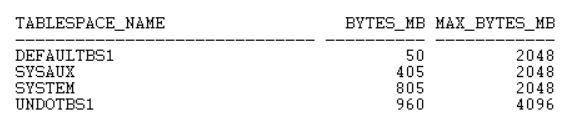
SQL>  SELECT TABLESPACE_NAME,BYTES/1024/1024 "BYTES_MB",MAXBYTES/1024/1024 "MAX_BYTES_MB" FROM DBA_DATA_FILES order by TABLESPACE_NAME;

SQL>  alter session set container = PDB$SEED;

SQL>  SELECT TABLESPACE_NAME,BYTES/1024/1024 "BYTES_MB",MAXBYTES/1024/1024 "MAX_BYTES_MB" FROM DBA_DATA_FILES order by TABLESPACE_NAME;

Step # 2:  Open a windows command prompt, set the environment variables (Make sure Oracle Home and Perl path is present).

> set ORACLE_SID=BABCDB

> set ORACLE_HOME=C:\Oracle12cR2_64Bit_DB\product

> set Path=C:\Oracle12cR2_64Bit_DB\product\bin;C:\Oracle12cR2_64Bit_DB\product\perl\bin;C:\Program Files (x86)\Common Files\Oracle\Java\javapath; C:\WINDOWS\system32;C:\WINDOWS;C:\WINDOWS\System32\...

> cd C:\Oracle12cR2_64Bit_DB\product\rdbms\admin

Step # 3:  My environment has a $ROOT CDB and $SEED PDB, I will be connecting to the $ROOT to install it.

perl catcon.pl -p 2 -u SYS/xxxxxxxxxx -l C:\temp\spatial -b catctx_install_babu -a 1 F:\Oracle12cR2_64Bit_DB\product\ctx\admin\catctx.sql 1babu 1SYSAUX 1TEMPTBS1 1NOLOCK;

catcon: ALL catcon-related output will be written to [C:\temp\spatial/catctx_install_babu_catcon_4620.lst]
catcon: See [C:\temp\spatial/catctx_install_babu*.log] files for output generated by scripts
catcon: See [C:\temp\spatial/catctx_install_babu_*.lst] files for spool files, if any
catcon.pl: completed successfully

Step # 4:  Verify the components:-

sqlplus SYS/xxxxxxxx@DEVCDB AS SYSDBA

SQL> SELECT TABLESPACE_NAME,BYTES/1024/1024 "BYTES_MB",MAXBYTES/1024/1024 "MAX_BYTES_MB" FROM DBA_DATA_FILES order by TABLESPACE_NAME;


SQL> select comp_id, control, schema, version, status, comp_name from dba_registry order by 1;


SQL> ALTER SESSION SET CONTAINER=PDB$SEED;

SQL> SELECT TABLESPACE_NAME,BYTES/1024/1024 "BYTES_MB",MAXBYTES/1024/1024 "MAX_BYTES_MB" FROM DBA_DATA_FILES order by TABLESPACE_NAME;


Step # 5:  Configure Language-specific default preferences (mine is U.S. English), connect as CTXSYS user and run below script:-

connect CTXSYS/xxxxx@devcdb 

@F:\Oracle12cR2_64Bit_DB\product\ctx\admin\defaults\drdefus.sql

After successful install,  lock the CTXSYS account and expire its password. 

conn SYS/xxxxxxxxxx@DEVCDB AS SYSDBA

Check for invalid objects in the database. If present, run utlrp.sql or recompile invalid objects.

col OBJECT_NAME for a30
col OBJECT_TYPE for a30
col OWNER for a20
SQL> select owner,object_name,object_type from dba_objects where status <> 'VALID' order by 1,2,3;

no rows selected


Sunday, May 24, 2020

Manually Creating an Oracle 12c R2 Container Database on Windows OS

Purpose: Manually Create an Oracle Container Database using SQL*Plus command prompt on Windows OS

Environment:
Database Software: Oracle 12c Release 2
Operating System: Windows Server 2012 R2 Standard - 64 Bit

1. Oracle Install: Already installed Oracle 12c Release 2 software as per my previous post.

Tip # 1: If you plan on using this install for more serious stuff (business purposes), its highly recommended to apply the latest available patch(es). Refer to my post on Installing Oracle Patch.

2. Oracle Net: Configure listener.ora, tnsnames.ora and sqlnet.ora files at "F:\Oracle12c_64Bit_DB\product\network\admin" folder with my typical settings:-

listener.ora :-

DEFAULT_SERVICE_LISTENER = BABCDB

INBOUND_CONNECT_TIMEOUT_LISTENER = 0

SID_LIST_LISTENER =
(SID_LIST =
(SID_DESC =
(SID_NAME = PLSExtProc)
(ORACLE_HOME = F:\Oracle12c_64Bit_DB\product)
(PROGRAM = extproc))
(SID_DESC =
(GLOBAL_DBNAME = BABCDB)
(ORACLE_HOME = F:\Oracle12cR2_64Bit_DB\product)
(SID_NAME = BABCDB)))

LISTENER =
(DESCRIPTION_LIST =
(DESCRIPTION =
(ADDRESS = (PROTOCOL = TCP)(HOST = SANDBOX26)(PORT = 1521))))

tnsnames.ora :-

BABCDB =
(DESCRIPTION =
(ADDRESS_LIST =
(ADDRESS = (PROTOCOL = TCP)(HOST = SANDBOX26)(PORT = 1521)))
(CONNECT_DATA =
(SERVER = DEDICATED)
(SERVICE_NAME = BABCDB)))

sqlnet.ora :-

SQLNET.INBOUND_CONNECT_TIMEOUT = 0
SQLNET.EXPIRE_TIME = 2
NAMES.DIRECTORY_PATH= (TNSNAMES, EZCONNECT)

3. DB Parameter [Init] File: Added below parameters in the initBABCDB.ora file and placed it at "F:\Oracle12c_64Bit_DB\product\database" folder:-

audit_file_dest='F:\Oracle12cR2_64Bit_DB\admin\adump'
audit_trail =none
compatible='12.0.0.0.0'
control_files='H:\ORACLE\ORADATA\BABCDB\control01.ctl','H:\ORACLE\ORADATA\BABCDB\control02.ctl','H:\ORACLE\ORADATA\BABCDB\control03.ctl'
db_block_size=8192
db_cache_size=157286400
db_domain=''
db_file_multiblock_read_count=16
db_name='BABCDB'
db_recovery_file_dest='F:\Oracle12cR2_64Bit_DB\admin\fast_recovery_area'
db_recovery_file_dest_size=2G
diagnostic_dest='F:\Oracle12cR2_64Bit_DB\admin\diagnostic_dest'
dispatchers='(PROTOCOL=TCP) (SERVICE=BABCDBXDB)'
enable_pluggable_database=true
fast_start_mttr_target=300
java_pool_size=157286400
job_queue_processes=10
large_pool_size=67108864
local_listener='LISTENER_BABCDB'
open_cursors=2000
pga_aggregate_limit=2147483648
pga_aggregate_target=104857600
processes=500
query_rewrite_enabled='TRUE'
remote_login_passwordfile='EXCLUSIVE'
session_cached_cursors=50
sga_max_size=629145600
shared_pool_size=692060160
sort_area_size=524288
star_transformation_enabled='FALSE'
streams_pool_size=50331648
timed_statistics=TRUE
undo_management='AUTO'
undo_retention=10800
undo_tablespace='UNDOTBS1'

4. Destination / Location Folders: Create folders for

audit_file_dest
db_recovery_file_dest
diagnostic_dest
control_files
datafiles and PDB seed

5. Create Oracle Service: Navigate to the bin folder, run oradim and when asked, provide the password of the local OS user that was created in the previous post.

cd F:\Oracle12cR2_64Bit_DB\product\bin

oradim -new -SID BABCDB -INTPWD xxxxxxxx -STARTMODE m -PFILE F:\Oracle12cR2_64Bit_DB\product\database\initBABCDB.ora
Enter password for Oracle service user: [provide password for OracleWinUsr user]
Instance created.

Note, the created service's start mode is manual, but its started right after creation. If not, make sure the Oracle service OracleServiceBABCDB is started.

6. Start the listener and mount the database:-

> cd F:\Oracle12cR2_64Bit_DB\product\bin

> lsnrctl start

> sqlplus SYS/xxxxxxxxxx@BABCDB AS SYSDBA

SQL> startup nomount

7. Create the (container) database:-

SQL> CREATE DATABASE BABCDB
USER SYS IDENTIFIED BY xxxxxxxxx
USER SYSTEM IDENTIFIED BY xxxxxxxxx
CONTROLFILE REUSE
LOGFILE
GROUP 1 ('H:\ORACLE\ORADATA\BABCDB\REDO_01.LOG') SIZE 100M REUSE,
GROUP 2 ('H:\ORACLE\ORADATA\BABCDB\REDO_02.LOG') SIZE 100M REUSE,
GROUP 3 ('H:\ORACLE\ORADATA\BABCDB\REDO_03.LOG') SIZE 100M REUSE
MAXLOGFILES 32
MAXLOGMEMBERS 4
MAXLOGHISTORY 100
MAXDATAFILES 254
MAXINSTANCES 1
EXTENT MANAGEMENT LOCAL
DATAFILE 'H:\ORACLE\ORADATA\BABCDB\SYSTEM_01.DBF' SIZE 300M REUSE AUTOEXTEND ON NEXT 5M MAXSIZE 2048m
SYSAUX DATAFILE 'H:\ORACLE\ORADATA\BABCDB\SYSAUX_01.DBF' SIZE 120M REUSE AUTOEXTEND ON NEXT 5M MAXSIZE 2048m
DEFAULT TABLESPACE DEFAULTBS1
DATAFILE 'H:\ORACLE\ORADATA\BABCDB\DEFAULT_01.DBF' SIZE 50M REUSE AUTOEXTEND ON NEXT 5M MAXSIZE 2048m
UNDO TABLESPACE UNDOTBS1
DATAFILE 'H:\ORACLE\ORADATA\BABCDB\UNDO_01.DBF' SIZE 200M REUSE AUTOEXTEND ON NEXT 5M MAXSIZE 4096m
DEFAULT TEMPORARY TABLESPACE TEMPTBS1
TEMPFILE 'H:\ORACLE\ORADATA\BABCDB\TEMP_01.DBF' SIZE 25M REUSE AUTOEXTEND on NEXT 1m MAXSIZE 4096m
UNIFORM SIZE 1M
CHARACTER SET WE8MSWIN1252
NATIONAL CHARACTER SET AL16UTF16
NOARCHIVELOG
ENABLE PLUGGABLE DATABASE
SEED
FILE_NAME_CONVERT = ('H:\ORACLE\ORADATA\BABCDB\','H:\ORACLE\ORADATA\BABCDB\SEEDPDB\')
SYSTEM DATAFILES SIZE 50M AUTOEXTEND ON NEXT 10M MAXSIZE 2048m
SYSAUX DATAFILES SIZE 50M
LOCAL UNDO OFF;

8. Create the dictionary views and system stored procedures

I created a folder called "C:\tmp\spatial" to direct the output files while running the catcdb.sql script.

This is done by running "catcdb.sql", which calls a perl script "catcdb.pl", both these files are located in "ORACLE_HOME\rdbms\admin" folder.

Tip # 2: Can't locate util.pm bug - Check this out.
Tip # 3: SP2-0640: Not connected error message - Check this out.

> set ORACLE_SID=BABCDB

> set ORACLE_HOME=F:\Oracle12cR2_64Bit_DB\product
> set PATH=F:\Oracle12cR2_64Bit_DB\product\bin;F:\Oracle12cR2_64Bit_DB\product\perl\bin;C:\Program Files\EMC NetWorker\nsr\bin;C:\Windows\system32;C:\Windows;C:\Windows\System32\Wbem;C:\Windows\System32\WindowsPowerShell\v1.0\

Get back to SQL*Plus and run "catcdb.sql" once again.

> sqlplus SYS/xxxxxxxxxx@BABCDB AS SYSDBA

SQL> @F:\Oracle12cR2_64Bit_DB\product\rdbms\admin\catcdb.sql

SQL> host perl -I &&rdbms_admin &&rdbms_admin_catcdb --logDirectory &&1 --logFilename &&2

Enter value for 1: C:\temp\catcdb [Location for log file]
Enter value for 2: BABU_CATCDB.LOG [Name of the log file]
Enter new password for SYS: ********
Enter new password for SYSTEM: ********
Enter temporary tablespace name: TEMPTBS1

9. Verify the log files at the provided location to confirm successful run or any errors. And query DBA_REGISTRY for components and its validity.

select comp_id, control, schema, version, status, comp_name from dba_registry order by 1;

DBA_REGISTRY