About Me

Database and GIS Consultant.
Showing posts with label ADB. Show all posts

Saturday, August 22, 2020

Migrate Oracle database from On-Premises to Autonomous Database (ADB) Cloud

Migrate Oracle database from On-Premises to Autonomous Database (ADB) Cloud using Oracle Data Pump


Objective: Migrate a schema from On-Premises Oracle Database to Oracle Autonomous Databases on Cloud using Data Pump


Environments: 

Destination DB: Oracle Autonomous Databases (ADB) on Cloud

Oracle Database 19c Enterprise Edition Release 19.0.0.0.0 - Production [Version 19.5.0.0.0]

Transaction Processing / Shared Infrastructure / Always Free configuration


Source DB: On-Premises, Windows 10, 64 Bit.

Oracle Database 18c Express Edition Release 18.0.0.0.0 - Production [Version 18.4.0.0.0]

I have already configured Oracle Net from my PC to connect to the ADB as per my previous post.


Step 1: Create and prepare sample schema at source DB 

Create a user called "BABUR" and some sample objects, so we can migrate this schema. 

@> conn sys/xxxxxxxx@XE as sysdba
Connected.

SYS@XE> ALTER SESSION SET CONTAINER = SDEDB;

Session altered.

create user BABUR identified by xxxxxxxx 
quota UNLIMITED on USERTBS1
default tablespace USERTBS1
CONTAINER=CURRENT;

GRANT 
CREATE VIEW, 
CREATE TABLE, 
CREATE SESSION, 
CREATE TRIGGER, 
CREATE SEQUENCE 
to BABUR;

CREATE DIRECTORY DATA_PUMP_DIR_SDE as 'C:\tmp\ADB_Exp';

GRANT READ,WRITE ON DIRECTORY DATA_PUMP_DIR_SDE TO BABUR;

CONN BABUR/xxxxxxxx@SDEDB

CREATE TABLE TEST_TAB (A NUMBER);

BEGIN
FOR X IN 1..100 LOOP
INSERT INTO TEST_TAB VALUES (X);
END LOOP;
COMMIT;
END;
/

CREATE INDEX TEST_IDX ON TEST_TAB(A);

CREATE VIEW TEST_VIEW AS SELECT * FROM TEST_TAB WHERE A > 50;

select object_name,object_type from user_objects order by 1;

OBJECT_NAME                    OBJECT_TYPE
------------------------------ -----------------------
TEST_IDX                       INDEX
TEST_TAB                       TABLE
TEST_VIEW                      VIEW

Step 2: Export the Schema using Oracle Data Pump 

Created an export parameter file called "BABUR_DP_PAR_EXP.par" with below content:-

schemas=BABUR
directory=DATA_PUMP_DIR_SDE
dumpfile=BABUR.dmp 
logfile=BABUR_DP_PAR_EXP.log 
exclude=GRANT,STATISTICS,SYSTEM_GRANT,ROLE_GRANT,DEFAULT_ROLE,TABLESPACE_QUOTA,USER,PRE_SCHEMA

Run the data pump export using the parameter file:- 

expdp "BABUR/xxxxxx@SDEDB" parfile=C:\tmp\ADB_Exp\BABUR_DP_PAR_EXP.par


Step 3: Upload the exported dump file.

In the Oracle Cloud Infrastructure Console, create a Bucket in the Object Storage and upload the dump file within that bucket:-


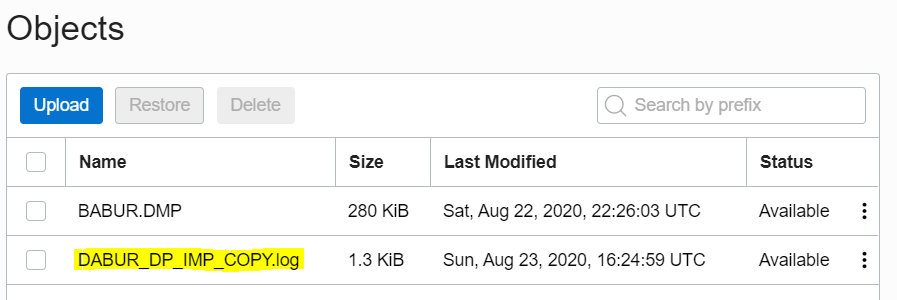
I have created a bucket called "BUCKETB", uploaded the exported dump file "BABUR.dmp" in the bucket and get the Object Details.


Note down the URL Path (URI), we will use it to run the data pump import:-
https://objectstorage.us-ashburn-1.oraclecloud.com/n/id0yw/b/BUCKETB/o/BABUR.DMP

Step 4: Generate Token

Auth Tokens are Oracle-generated token strings that is associated with Oracle Cloud Infrastructure username. We will create credential object with the Auth Token strings as password. The credential object will be used to run Oracle data pump import.

In the Oracle Cloud Infrastructure Console, Go to Identity --> Users --> your username  (the one that is not federated) 


On the left hand side, click on “Auth Tokens”. Create a new token by click on “Generate Token”. 


Note down the random generated value, which will be used as credential password in DBMS_CLOUD. Lets say, mine is "My_Token_Password"

Step 5: Create Credential  Object at ADB

conn admin/xxxxxxxx@tp01_low

ADMIN@tp01_low> select * from USER_CREDENTIALS;

no rows selected

BEGIN
  DBMS_CLOUD.CREATE_CREDENTIAL(
    credential_name => 'BABU_CRED',
    username => 'baburxxxxxy@hotmail.com',
    password => 'My_Token_Password'
  );
END;
/

COL CREDENTIAL_NAME FOR A15
COL ENABLED FOR A10
SET LINES 150
select CREDENTIAL_NAME,ENABLED from USER_CREDENTIALS;

CREDENTIAL_NAME ENABLED
--------------- ----------
BABU_CRED       TRUE

Step 6: Create DB User at Destination (ADB)

Create a user called "DABUR"

create user DABUR identified by xxxxxxxxx quota 100m on DATA;

GRANT 
CREATE VIEW, 
CREATE TABLE, 
CREATE SESSION, 
CREATE TRIGGER, 
CREATE SEQUENCE 
to DABUR;

Step 7: Run Data Pump import as ADB admin user.

The data pump import can be run from any external environment where Oracle client and ADB connections are configured and compatible. I am running this from the source database environment.

Created an import parameter file called "BABUR_DP_PAR_IMP.par" with below content:-

remap_schema=BABUR:DABUR
remap_tablespace=USERTBS1:DATA
directory=data_pump_dir    
credential=BABU_CRED     
dumpfile=https://objectstorage.us-ashburn-1.oraclecloud.com/n/id0yw/b/BUCKETB/o/BABUR.DMP
logfile=DABUR_DP_IMP.log 

Run the data pump import using the parameter file:- 

impdp "admin/xxxx@tp01_low" parfile=C:\tmp\ADB_Exp\DABUR_DP_PAR_IMP.par
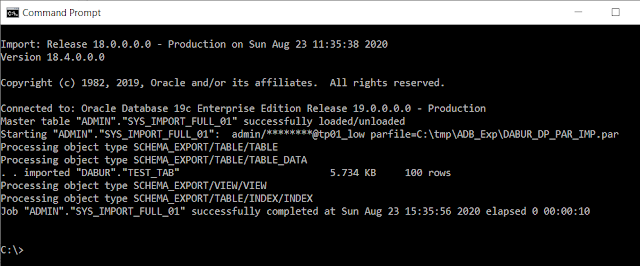


Step 8: Verify the import and Clean up

Check object counts at the destination:-

select object_name,object_type from dba_objects where owner = 'DABUR' order by 1;
 
OBJECT_NAME                    OBJECT_TYPE
------------------------------ -----------------------
TEST_IDX                       INDEX
TEST_TAB                       TABLE
TEST_VIEW                      VIEW

Apparently this simple schema import ran smooth with no errors, but if there were errors that needed to be addressed or recompiled or recreated, you may want to review the (import) log file, which is stored in the ADB server at the "data_pump_dir" directory. Let us see how to retrieve it and later delete it from the ADB server.

Copy the import log from ADB server to cloud Object Storage 

col CREATED for a35
col LAST_MODIFIED for a35
set lines 150

SELECT OBJECT_NAME,BYTES,CREATED,LAST_MODIFIED FROM table(dbms_cloud.list_files('DATA_PUMP_DIR'));

OBJECT_NAME                         BYTES CREATED                             LAST_MODIFIED
------------------------------ ---------- ----------------------------------- -----------------------------------
DABUR_DP_IMP.log                     1335 23-AUG-20 03.35.46.000000 PM +00:00 23-AUG-20 03.35.57.000000 PM +00:00

BEGIN
DBMS_CLOUD.PUT_OBJECT(
credential_name => 'BABU_CRED',
object_uri => 'https://objectstorage.us-ashburn-1.oraclecloud.com/n/id0yw/b/BUCKETB/o/DABUR_DP_IMP_COPY.log',
directory_name => 'DATA_PUMP_DIR',
file_name => 'DABUR_DP_IMP.log');
END;
/

Now you will see the import logfile copy in the Object Storage, which you can download to your PC and examine it.


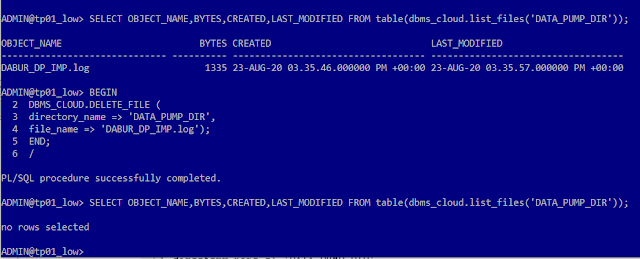
Once copied to Object Storage, you can delete it from the ADB server / directory:-

BEGIN
DBMS_CLOUD.DELETE_FILE ( 
directory_name => 'DATA_PUMP_DIR',
file_name => 'DABUR_DP_IMP.log');
END;
/


Here we saw how to migrate a schema from an On-Premises Oracle Database to Oracle Autonomous Databases on Cloud using Oracle Data Pump. 

Hope it helps, appreciate your feedback, thanks.

Wednesday, July 29, 2020

Weird Oracle tables (TST_TAB) created by Esri software gets piled up in the RECYCLEBIN

Weird Oracle tables (TST_TAB) created by Esri software gets piled up in the RECYCLEBIN

Environment:  
Esri ArcGIS Desktop Software - ArcCatalog/ArcMap 10.6.1
Oracle 19c [Oracle Autonomous Database (ADB) Cloud]
No Geodatabase present.

Weird tables gets created and then dropped by Esri ArcGIS software products and it remains in the recyclebin. 

Esri software creates and drops a table called TST_TAB every single time when connected from Esri software. You will see it when you query TAB or RECYCLEBIN:-

BABU@cwtp_low> SELECT * FROM TAB;

TNAME                          TABTYPE        CLUSTERID
------------------------------ ------------- ----------
PA_COUNTY_MAP                  TABLE
PA_COUNTY_MAP_N                TABLE
MDRT_9AA2$                     TABLE
MDRT_9AAD$                     TABLE
BIN$q53O51hlUBngU54UAAqFIg==$0 TABLE
BIN$q53IQRxFF3TgU54UAAobLg==$0 TABLE
BIN$q53KQiUKSFjgU54UAAqHjw==$0 TABLE
BIN$q53Yz2etbCXgU54UAAqAQA==$0 TABLE

BABU@cwtp_low> SHOW RECYCLEBIN;
ORIGINAL NAME    RECYCLEBIN NAME                OBJECT TYPE  DROP TIME
---------------- ------------------------------ ------------ -------------------
TST_TAB          BIN$q53Yz2etbCXgU54UAAqAQA==$0 TABLE        2020-07-29:23:23:44
TST_TAB          BIN$q53O51hlUBngU54UAAqFIg==$0 TABLE        2020-07-29:23:20:58
TST_TAB          BIN$q53KQiUKSFjgU54UAAqHjw==$0 TABLE        2020-07-29:23:19:40
TST_TAB          BIN$q53IQRxFF3TgU54UAAobLg==$0 TABLE        2020-07-29:23:19:06

Structure of this table:-

BABU@cwtp_low> DESC "BIN$q53IQRxFF3TgU54UAAobLg==$0"
 Name                       Null?    Type
 -------------------------- -------- -----------
 ID                                  NUMBER(38)
 
Workaround: Not sure if its a bug from Esri products or something else, but the fix that worked for me is to restore one of those tables (or manually create a table with the same name - TST_TAB) and let it sit in the schema. Since the table already exist, new one with the same name cannot be created. And thankfully, the software doesn't drop the table before creating a new one, otherwise, it would have been a nightmare:-

BABU@cwtp_low> flashback table TST_TAB to before drop;

Flashback complete.

BABU@cwtp_low> purge recyclebin;

Recyclebin purged.

BABU@cwtp_low> SELECT * FROM TAB;

TNAME                          TABTYPE        CLUSTERID
------------------------------ ------------- ----------
PA_COUNTY_MAP                  TABLE
PA_COUNTY_MAP_N                TABLE
MDRT_9AA2$                     TABLE
TST_TAB                        TABLE
MDRT_9AAD$                     TABLE

Let me know if you have come across this and how you handled it. Thanks! 

Tuesday, July 28, 2020

Limitations of Oracle Autonomous Database (ADB) Cloud

Reasons Why Oracle Autonomous Database (ADB) Cloud May NOT Be Suitable For Me.

Environment: Always Free Oracle Autonomous Database [database-as-a-service]

1. ADMIN user: In the Oracle Cloud ADB, you will be given access as ADMIN user. Which is less privileged for many normal DBA tasks that I currently do.

2. Tablespace Creation: You cannot create tablespaces with this user, it will result in an "ORA-01031: insufficient privileges" error.

ADMIN@cwtp_low> set lines 120
ADMIN@cwtp_low> col file_name for a85
ADMIN@cwtp_low> select file_name, bytes/1024/1024/1024 size_gb from dba_data_files order by 1;

FILE_NAME                                                                                SIZE_GB
------------------------------------------------------------------------------------- ----------
+DATA/FEKY1POD/A9CA021DABDFFA2CE0539F14000ADF5F/DATAFILE/data.1827.1045070211          .09765625
+DATA/FEKY1POD/A9CA021DABDFFA2CE0539F14000ADF5F/DATAFILE/dbfs_data.1831.1045070211     .09765625
+DATA/FEKY1POD/A9CA021DABDFFA2CE0539F14000ADF5F/DATAFILE/sysaux.1828.1045070211       3.22607422
+DATA/FEKY1POD/A9CA021DABDFFA2CE0539F14000ADF5F/DATAFILE/system.1825.1045070211       .420898438
+DATA/FEKY1POD/A9CA021DABDFFA2CE0539F14000ADF5F/DATAFILE/undo_2.4299.1045538735                1
+DATA/FEKY1POD/A9CA021DABDFFA2CE0539F14000ADF5F/DATAFILE/undotbs1.1826.1045070211              1
+DATA/sampleschema_dbf                                                                       200

7 rows selected.

ADMIN@cwtp_low> CREATE TABLESPACE xxxx DATAFILE
  2  '+DATA' SIZE 100M AUTOEXTEND ON NEXT 1024K MAXSIZE 2048M
  3  EXTENT MANAGEMENT LOCAL
  4  AUTOALLOCATE SEGMENT SPACE MANAGEMENT AUTO;
CREATE TABLESPACE xxxx DATAFILE
*
ERROR at line 1:
ORA-01031: insufficient privileges

3. SYS User: If you are in a situation to create an Enterprise Geodatabase (Esri), the tool will need SYS Password in order to execute it. Where as in the Oracle Cloud ADB, you will not be provided with SYS Password.

ADMIN@cwtp_low> select username,account_status from dba_users order by 1;

USERNAME                       ACCOUNT_STATUS
------------------------------ --------------------------------
ADBSNMP                        LOCKED
ADMIN                          OPEN
APEX_190200                    LOCKED
APEX_200100                    LOCKED
APEX_INSTANCE_ADMIN_USER       LOCKED
APPQOSSYS                      LOCKED
AUDSYS                         LOCKED
C##ADP$SERVICE                 OPEN
C##API                         OPEN
C##CLOUD$SERVICE               OPEN
C##CLOUD_OPS                   OPEN
C##DV_ACCT_ADMIN               LOCKED
C##DV_OWNER                    LOCKED
C##OMLIDM                      OPEN
CTXSYS                         LOCKED
DBSFWUSER                      LOCKED
DBSNMP                         OPEN
DIP                            LOCKED
DVF                            LOCKED
DVSYS                          LOCKED
FLOWS_FILES                    LOCKED
GGADMIN                        LOCKED
GGSYS                          LOCKED
GSMADMIN_INTERNAL              LOCKED
GSMCATUSER                     LOCKED
GSMUSER                        LOCKED
LBACSYS                        LOCKED
MDDATA                         LOCKED
MDSYS                          LOCKED
OML$PROXY                      OPEN
ORACLE_OCM                     LOCKED
ORDS_METADATA                  EXPIRED & LOCKED
ORDS_PUBLIC_USER               OPEN
OUTLN                          LOCKED
REMOTE_SCHEDULER_AGENT         LOCKED
SH                             LOCKED
SSB                            LOCKED
SYS                            OPEN
SYS$UMF                        LOCKED
SYSBACKUP                      LOCKED
SYSDG                          LOCKED
SYSKM                          LOCKED
SYSRAC                         LOCKED
SYSTEM                         OPEN
XDB                            LOCKED
XS$NULL                        EXPIRED & LOCKED

4. Library Objects to 
    Create Spatial Type 
    Create / Enable Enterprise Geodatabase
The database user "SDE" will need to have "CREATE LIBRARY" privilege. If you try to grant "CREATE LIBRARY" privilege in ADB, it will fail:-

ADMIN@cwtp_low> grant CREATE LIBRARY to SDE;
grant CREATE LIBRARY to SDE
*
ERROR at line 1:
ORA-01031: insufficient privileges

Without the Library and without SYS user, you can't create SDE.ST_GEOMETRY type which will refer to  "st_shapelib.dll". Which means, you cannot have an ESRI Geodatabase in an Oracle ADB. 


5. Transportable Tablespace - Bulk Data Loads: I currently leverage this option to move bulk datasets (like Raster Catalogs and Mosaiced Raster Datasets) from one environment to another (for example, Test to Production).  The initial load involves heavy-duty data processing which is complex by nature, which not only takes lots of resources, but also longer duration. So, moving it to another environment through transportable tablespace is a valuable option, which cannot be used in Oracle Cloud ADB.  

6. Network performance - Random disruption and very slow.


Here I have listed some limitations that I am currently facing with the Oracle Autonomous Database (ADB) Cloud, please share your experience with regards to limitations, if any.  Thanks.


Saturday, July 11, 2020

Configure Oracle Client with multiple Oracle wallets and locations and connect with different Autonomous Databases

Purpose: How to Configure Oracle Client with multiple Oracle wallets/locations for different Autonomous Databases and connect with SQL*Plus from your PC.

Environment: 
Database: Oracle Cloud, 19c, Autonomous Databases (ADB)
Client: Oracle 12c 64Bit Client from my Windows PC
Configuration Files: SQLNET.ORA and TNSNAMES.ORA

Step # 1: I have already have two ADBs (names: CWTP and CWDW) in Oracle Cloud and downloaded Oracle wallets (zip files and extracted) for each of those databases and placed at two different folders:-
C:\Oracle12cR2_64Bit_CL\wallet\cwdw
C:\Oracle12cR2_64Bit_CL\wallet\cwtp

Step # 2: From the extracted zip files (wallets), I copied and pasted contents of TNS entries from the sqlnet.ora and tnsnames.ora files that came along with the wallets into the SQLNET.ORA and TNSNAMES.ORA files ($ORACLE_HOME\Network\Admin) that's used by my Oracle client, which looked as follows:-

SQLNET.ORA

SQLNET.AUTHENTICATION_SERVICES= (NTS)
NAMES.DIRECTORY_PATH= (TNSNAMES, EZCONNECT)
# WALLET_LOCATION = (SOURCE = (METHOD = file) (METHOD_DATA = (DIRECTORY=C:\\Oracle12cR2_64Bit_DB\\wallet\\cwdw)))
SSL_SERVER_DN_MATCH=yes


As you notice above, I commented out WALLET_LOCATION parameter, which is configured in the TNSNAMES.ORA file


Step # 3: TNSNAMES.ORA

cwtp_low = (description= (retry_count=20)(retry_delay=3)(address=(protocol=tcps)(port=1533)(host=adb.au-xxxxxxx-1.oraclecloud.com))(connect_data=(service_name=xxxxxcwtp_low.atp.oraclecloud.com))(security=(my_wallet_directory = "C:\\Oracle12cR2_64Bit_CL\\wallet\\cwtp")(ssl_server_cert_dn="CN=xxxxx.oraclecloud.com,OU=Oracle BMCS US,O=Oracle Corporation,L=Redwood City,ST=California,C=US")))

cwdw_low = (description= (retry_count=20)(retry_delay=3)(address=(protocol=tcps)(port=1533)(host=adb.au-xxxxxxx-1.oraclecloud.com))(connect_data=(service_name=xxxxxcwdw_low.adwc.oraclecloud.com))(security=(my_wallet_directory = "C:\\Oracle12cR2_64Bit_CL\\wallet\\cwdw")(ssl_server_cert_dn="CN=xxxxx.oraclecloud.com,OU=Oracle BMCS US,O=Oracle Corporation,L=Redwood City,ST=California,C=US")))


As you notice in the TNSNAMES.ORA file, I have added MY_WALLET_DIRECTORY (within the SECURITY parameter) to include the wallet location for each TNS Aliases. S

Step # 4: Test - Here are my tests connecting to the ADBs using SQL*Plus from my PC:-


Let me know how it works for you and also if there are any other options available to configure multiple wallets / locations for Oracle client.